


If your online store receives healthy traffic but struggles to convert visitors into customers, the problem often lies within the user experience. A User Experience (UX) audit evaluates your digital storefront from a customer’s perspective to identify hidden issues and maximize conversion rates.
TL;DR:
- A UX audit is a structured review of how users interact with your website and where friction blocks conversions, purchases, or key actions.
- It’s useful before a redesign, after a major launch, or when conversion metrics drop without a clear reason.
- The process covers navigation, checkout, mobile experience, performance, accessibility, and trust signals.
- User experience audit delivers a prioritized report with findings, evidence, severity ratings, and recommended fixes.
This practical guide shows ecommerce store owners how a structured UX audit works, what an actionable checklist covers, and how to turn design diagnostics into clear revenue gains.
Table of Contents:
Why Online Stores Lose Conversions
What Is a UX Audit?
When Should You Conduct a UX Audit?
Core UX Audit Methods
Tools for a Successful UX Audit
Who Should Run a UX Audit?
What to Prepare Before Starting a UX Audit
How to Conduct a UX Audit Step-by-Step
What Exactly Should Be Audited?
How to Document UX Audit Findings
What a UX Audit Report Looks Like
Real UX Audit Example: BelVG
Common UX Audit Mistakes to Avoid
Conclusion: What a UX Audit Can Do for Your Store
Why Online Stores Lose Conversions
Poor usability directly impacts your revenue. Conviva’s 2025 State of Digital Experience Report highlights that 91% of consumers encountered frustrating digital issues in the past year. Furthermore, 88% of online consumers are less likely to return to a site they bought from after a bad user experience.
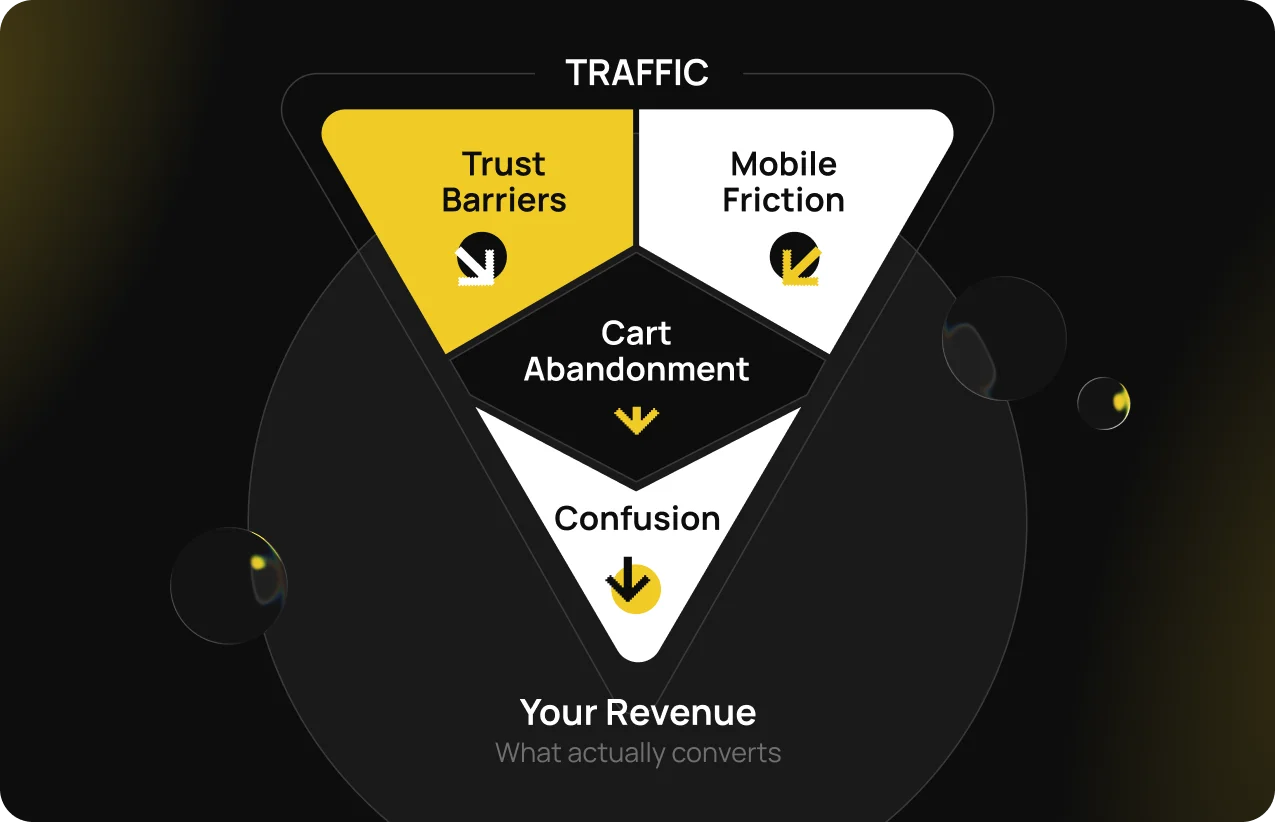
The chart above shows where those losses come from
These points manifest as visible business losses across your sales funnel:
- Conversion drop-offs. Shoppers abandon their journeys during critical checkout transitions.
- Cart abandonment. Unclear shipping costs, mandatory registration, or complex forms halt completed orders.
- High bounce rates. Slow loading speeds and confusing landing page layouts drive users away instantly.
- Low CTA click rates. Primary buttons sit below the fold or remain visually obscured.
- Mobile friction. Tiny tap targets and broken mobile layouts disrupt smartphone shoppers.
According to the Baymard Institute, improving checkout usability can significantly boost conversion rates, with fixes in the checkout flow alone can increase conversions by up to 35% on an average large ecommerce site.
Audit findings are often prioritized against proven ecommerce checkout best practices to maximize impact.
“Conducting UX audits quarterly is advisable, as users change periodically and platforms or features are updated. Therefore, this task needs continual attention.”
Galina Solopiy, UX/UI Designer, BelVG
What Is a UX Audit?
A User Experience audit is a structured review of how customers interact with your online store. It isolates exactly where design issues prevent users from purchasing or finding products.
Unlike a redesign, a website user experience audit does not change anything. It tells you what to change and why.
To understand its value, business owners must separate a UX audit from other common optimization terms:
- Not a heuristic evaluation. Heuristic evaluation is simply one expert review method used within a full audit.
- Not usability testing. Usability testing gathers direct user feedback and validates real user needs through direct observation, while an audit combines this data with performance and analytics reviews.
- Not a CRO audit. Conversion Rate Optimization audits test specific marketing hypotheses, whereas UX audits diagnose the underlying usability flaws.
- Not a redesign. Launching a visual redesign without an initial audit risks carrying old usability errors into a new layout.
See the table below to understand what different audits check and why ecommerce store needs each.
| UX audit | CRO audit | UI audit | |
| Goal | Find where users struggle to complete key actions | Find where conversion is lost and why | Find where visual and interface design are inconsistent or unclear |
| What it checks | Navigation, flows, mobile, accessibility, performance, trust, checkout | Funnel drop-off points, landing page effectiveness, CTAs, A/B test opportunities | Layout, typography, color, component consistency, design system compliance |
| Output | Prioritized list of usability fixes tied to business impact | Hypotheses and experiment roadmap for conversion improvement | Design recommendations and updated component or style guidelines |
| When to use it | Before a redesign, when KPIs drop, after a major launch, or as a regular review | When the conversion rate is underperforming, and you need to know what to test | When visual inconsistency is affecting trust, brand perception, or usability |
Audits comparison table
Types of UX audit
Depending on your goals, a UX design audit can be scoped broadly or focused on a specific layer:
- Usability audit examines navigation flow, interaction design, and task completion to identify friction points that lead to confusion or cart abandonment.
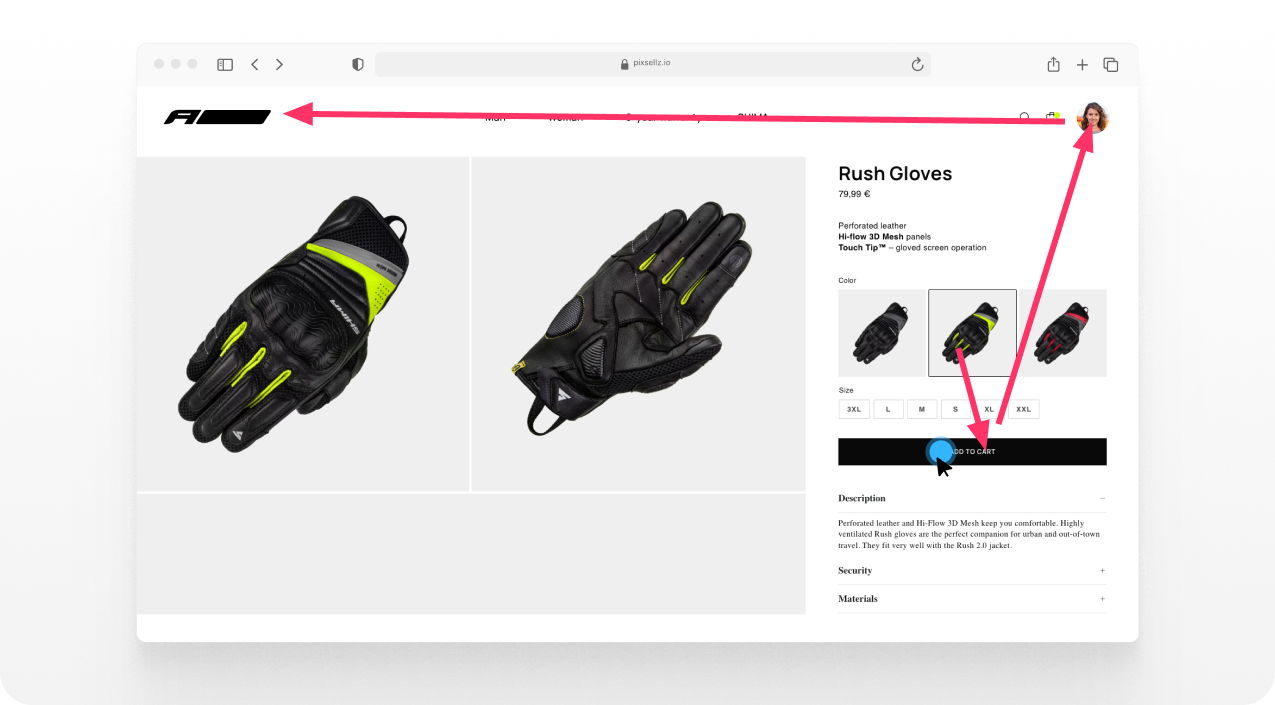
Usability audit shows the user’s interaction with the product page and leaving it
- Accessibility audit checks WCAG Accessibility Compliance (global guidelines for making websites usable for people with disabilities). It covers keyboard navigation, screen reader compatibility, color contrast, and alt text. It’s relevant both for inclusivity and legal risk.
- Information architecture audit evaluates how content is structured and labeled, whether users can find what they need intuitively, and where confusing or redundant structures disrupt the journey.
- Visual design audit reviews layout, typography, color, and brand consistency to ensure the design supports usability rather than working against it.
- Content audit checks the quality, relevance, and tone of on-page content to identify gaps, inconsistencies, or messaging that undermines user trust or clarity.
In practice, most full user experience audits combine several of these layers. A standalone quick review might focus on just one. For example, an accessibility audit ahead of a launch, or an information architecture audit before restructuring a category page.
When Should You Conduct a UX Audit?
As a baseline, most ecommerce sites benefit from a full UX review at least once a year. But the real signal is change. If something shifts in your product, traffic, or performance, it’s worth doing an audit sooner rather than waiting for the annual review.
Key triggers that indicate your online store needs a UX audit:
- Before a redesign. A UX audit prevents the transition of existing problems into a new design. Without it, redesigns often recreate the same friction with different visuals.
- After a major launch or update. New features and layout changes can introduce new pain points. A post-launch audit catches regressions before they compound.
- When KPIs drop. Unexplained falls in conversion rate, session duration, or engagement signal a UX problem that analytics tools alone can’t pinpoint.
- When complaints grow. Customer support tickets about navigation, checkout errors, or mobile issues are direct evidence of UX debt.
- Before scaling traffic or paid acquisition. Sending more traffic to a site with a poor user experience increases costs without improving results. A UX audit, in combination with a conversion rate optimization audit, first makes acquisition spend more efficient.
See it applied to a real client – meat4you case study, when a UX audit was required after migration to Magento 2.
PwC survey found that 32% of customers would leave a brand they like after one bad experience. When UX audits are performed regularly, they help retain customers, improve customer satisfaction, boost conversion rates, and bring more organic traffic.
Core UX Audit Methods
A comprehensive audit combines quantitative data with qualitative insights to diagnose the health of usability. This approach pairs numerical drops with behavioral evidence.
The following matrix outlines the primary methods used to evaluate store performance:
| Method | What it reveals | Best for |
| Heuristic evaluation | Layout flaws compared against industry design standards | Expert-led structural review |
| Analytics review | Funnel drop-offs and device performance gaps | Establishing a quantitative baseline |
| Session recordings | Exact user paths, rage clicks, confusion moments | Identifying why shoppers leave a page |
| Heatmaps | Where users click, scroll, and ignore content | Analyzing CTA placement |
| Usability testing | How real users complete tasks | High-confidence issue validation |
| Accessibility audit | WCAG compliance, screen reader compatibility | Inclusive UX and compliance risk |
You do not need all methods in every audit. For a quick checkout-focused review, analytics + recordings + heuristic evaluation usually give you what you need. For a full pre-redesign audit, it’s better to conduct usability tests and user surveys.
Tools for a Successful UX Audit
Different optimization goals require different specialized tools. Business owners can review their current software stack against standard industry options:
- Behavior analytics: Google Analytics 4, Matomo.
- Session tracking and heatmaps: Hotjar, Microsoft Clarity, FullStory.
- Digital experience platform (DXP): Contentsquare, which combines heatmaps, session replay, and behavior analytics in one platform.
- User feedback and surveys: Typeform, Hotjar Surveys.
- Accessibility assessment: axe DevTools, WAVE, Google Lighthouse.
- Performance testing: PageSpeed Insights, GTmetrix.
Most tools have free tiers that cover basic audit needs. For a full ecommerce UX audit, Hotjar + GA4 + axe DevTools + PageSpeed Insights covers the core data layer at no cost. Some of them need to be set up.
Our free UX audit is designed to identify the points that stop your customers from buying.

Uncover Your Store's Hidden Drop-Off Points
Learn how real users interact with your navigation, cart, and checkout flows
Contact usWho Should Run a UX Audit?
A UX design audit can be done internally or by an external specialist. The right choice depends on the scope, available expertise, and need for objectivity.
Internal teams can handle smaller audits when the focus is limited to a specific page or user flow, and they have access to analytics, session recordings, and basic UX knowledge.
External specialists are usually the better option for full-site audits, major redesigns, or stores without dedicated UX expertise. They bring an unbiased perspective, which helps uncover issues internal teams may overlook.
In practice, a hybrid model often works well. Internal teams provide business context and historical data, while an external specialist brings objectivity and ecommerce-specific pattern recognition.
Thus, the useful input comes from:
- Product owners or founders, who provide business goals and constraints.
- Developers or tech leads who assess implementation effort.
- Marketing managers, who provide acquisition and campaign context.
- Customer support teams, which surface recurring customer issues and complaints.
What to Prepare Before Starting a UX Audit
The quality of an audit depends on the inputs available before it begins. Arriving with the right data in place saves time and increases the accuracy of findings.
Access checklist:
- Previous UX audits, if available, including findings and unresolved issues
- Business goals and current KPIs
- GA4 / analytics access with at least 90 days of data
- Heatmap and session recording access (Hotjar, Clarity, or equivalent)
- Audience segments and user personas
- Previous audit reports, if any
- Stakeholder contacts and sign-off on scope
- Agreed deliverable format, such as reports or presentations
- Any known constraints, including development timeline, budget, and off-limits areas
Regardless of who performs the audit, one of the most common reasons findings go unused is a lack of alignment among stakeholders. Teams may have different expectations about the targets, the areas being evaluated, or what happens after recommendations are delivered.
Before the audit starts, stakeholders should agree on the business problem being examined, the user journeys in scope, and the expected deliverables.
This shared understanding helps ensure that the audit leads to meaningful action rather than another report that sits unread.
How to Conduct a UX Audit Step by Step
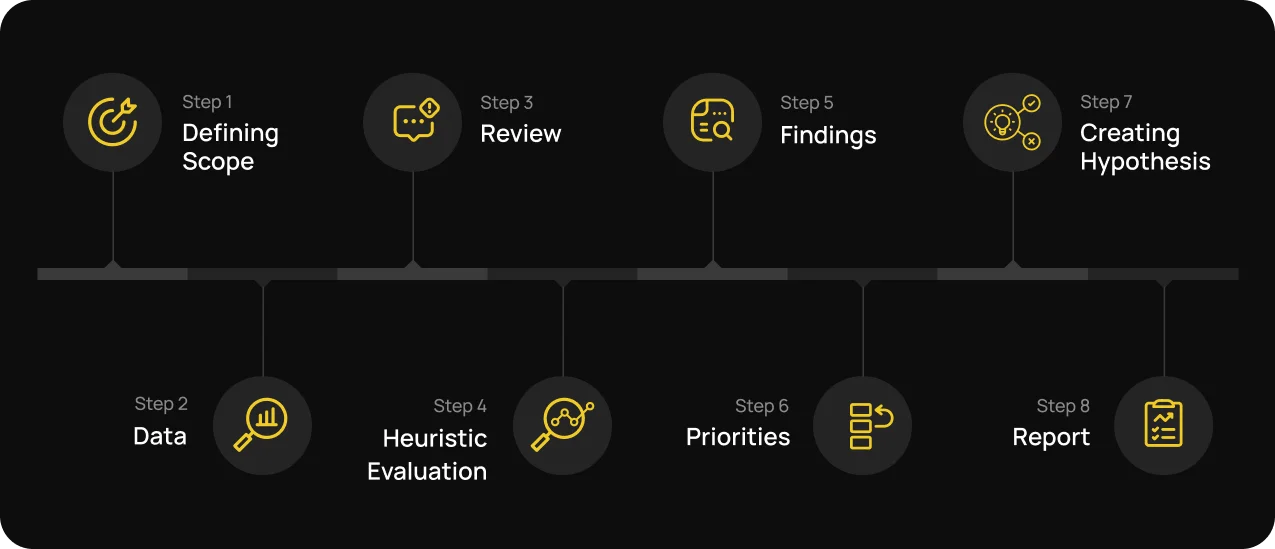
UX audit diagram
A UX audit involves several stages, from defining scope to prioritizing findings. Each step of the UX research builds on the one before it. And the quality of the final report’s findings depends on the groundwork laid at the beginning.
Step 1: Define scope and business objectives
Before collecting any data, it’s required to define clear UX audit aims.
A checkout that doesn’t convert is a different scope than a full site review before a platform migration.
A narrow scope means faster audit and more specific findings.
A broad scope means more patterns and more preparation time.
Step 2: Analyzing user behavior through quantitative and qualitative data
Quantitative data highlight GA4 funnel reports, bounce rates, page-level drop-off, device and browser splits, and site speed scores.
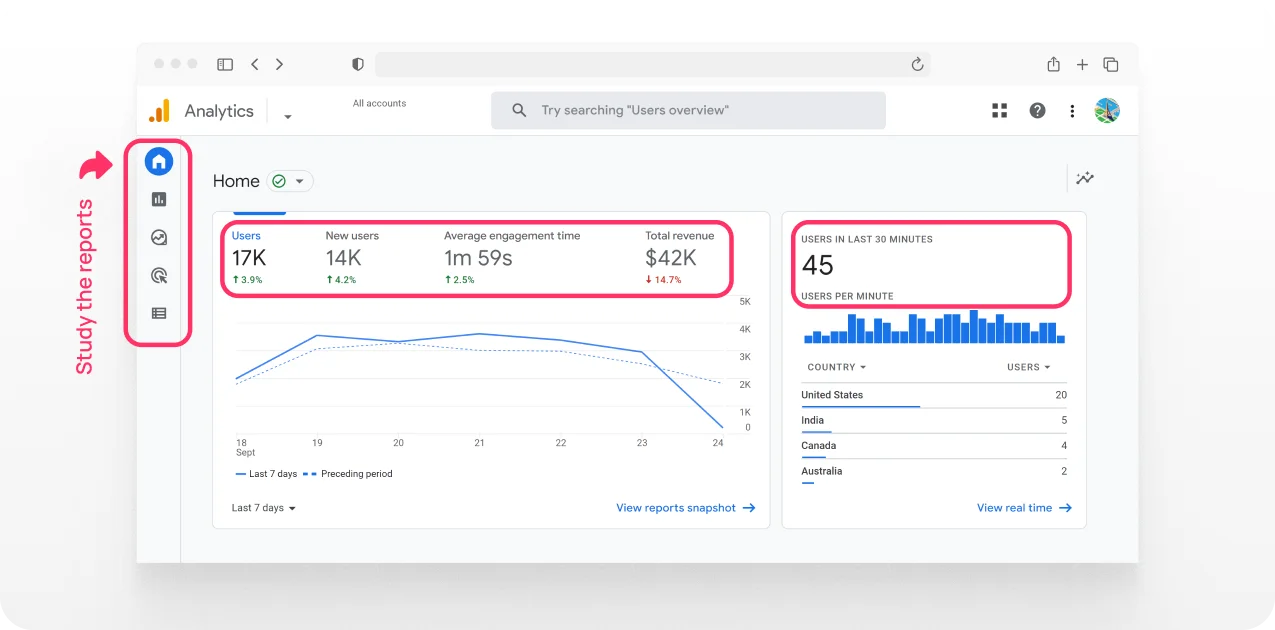
GA4 report to gather quantitative data
Qualitative data include session recordings, heatmaps, user survey responses, customer support ticket themes, and user interview notes.
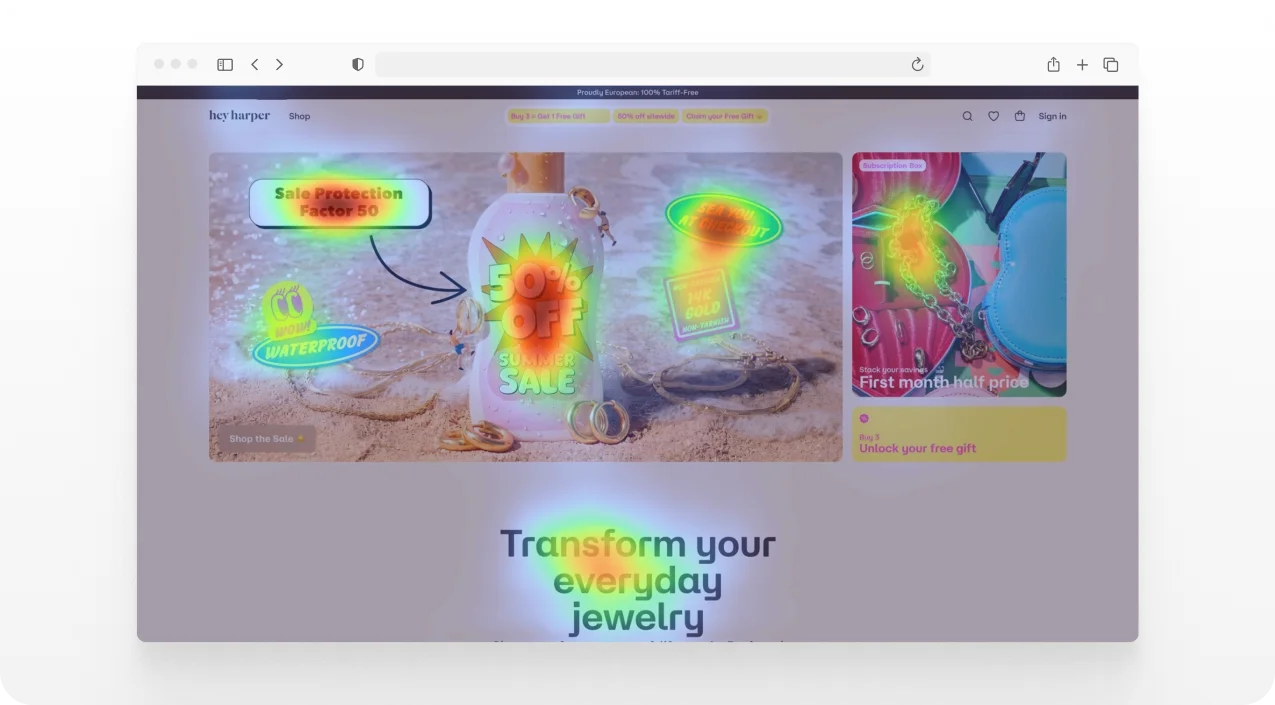
Red hotspots show where users focus their attention on the page
Both are needed. Session recordings and heatmaps help reveal user pain points that analytics alone cannot explain.
Step 3: Reviewing the user journey
With data in hand, the focus shifts to walking the journeys that matter most on both desktop and mobile. The goal here is to identify where the experience creates hesitation, confusion, or unnecessary effort.
Step 4: Audit usability heuristics to uncover usability issues
One essential part of a digital product audit is the heuristic evaluation. In the 90s, Jakob Nielsen developed 10 usability heuristics for interaction design that experts must follow during a UX review.
According to these usability heuristics principles, any ecommerce store should:
- Provide clear feedback. Users should always know what is happening. For example, when an item is added to the cart or an order is being processed.
- Support user control and recovery. Allow easy undo actions, cart edits, and step-by-step checkout navigation without losing progress.
- Maintain consistency. Buttons, labels, and layouts should behave consistently across product pages, the cart, and checkout to avoid confusion.
- Prevent errors before they happen. Highlight missing fields in forms early and avoid letting users proceed with invalid inputs.
- Keep interfaces simple and focused. Reduce distractions on product and checkout pages so users can complete purchases without trouble.
These tips serve to identify why user frustration may occur and understand the product’s user experience.
Step 5: Review accessibility, mobile, and performance
Usability problems do not exist only in the user interface. This step covers WCAG compliance basics, mobile usability across device sizes, and Core Web Vitals assessment that checks LCP (load time of the main content), INP (responsiveness to user actions), and CLS (visual stability of layouts).
For ecommerce stores, smartphones account for around 75-78% of retail website traffic globally, as of 2026. It makes mobile performance and user behavior key focus areas in most audits.
Step 6: Identify patterns and root causes
Once the expert has collected the findings, it’s necessary to group by theme and examine for relationships before anything reaches the report.
The critical distinction here is between symptoms and root causes. For example, a low click rate on a CTA might reflect weak copy, poor placement, a visual hierarchy problem, or a trust issue earlier in the journey.
Fixing symptoms without understanding the cause often leads to the problem recurring.
Step 7: Creating hypotheses
After issues are identified and analyzed, there is a missing step: synthesis and hypothesis generation. This is where findings are turned into testable assumptions that link user behavior to business outcomes.
Each issue should be framed as a hypothesis:
“If we do [X], then we expect [Y] to happen, because [Z].”
It connects user experience problems to measurable results like conversion rate, revenue, cart completion, or support volume. In ecommerce, it is especially important since small UX issues often lead to direct revenue loss through cart abandonment or checkout drop-offs.
Good hypotheses are based on real user data such as funnels, session recordings, or support tickets.
Step 8: Prioritize findings after the UX audit process is complete
UX audit findings should be ranked using three dimensions: severity, business impact, and effort. It helps teams decide what to fix first and what can wait.
| Severity | Business impact | Effort | Action |
| Critical issue blocking key user flow | Direct revenue or conversion loss | Low to high | Fix immediately |
| Major friction affecting key actions | Noticeable drop in conversions or engagement | Medium | Schedule next sprint |
| Minor usability issue | Limited impact on KPIs | Low | Fix when capacity allows |
| Cosmetic or edge-case issue | No clear business impact | Low | Backlog or ignore |
Prioritization model used in user experience audits
See the screenshot below. The final step is translating prioritized findings into a document that non-design stakeholders can read, understand, and use to make decisions.
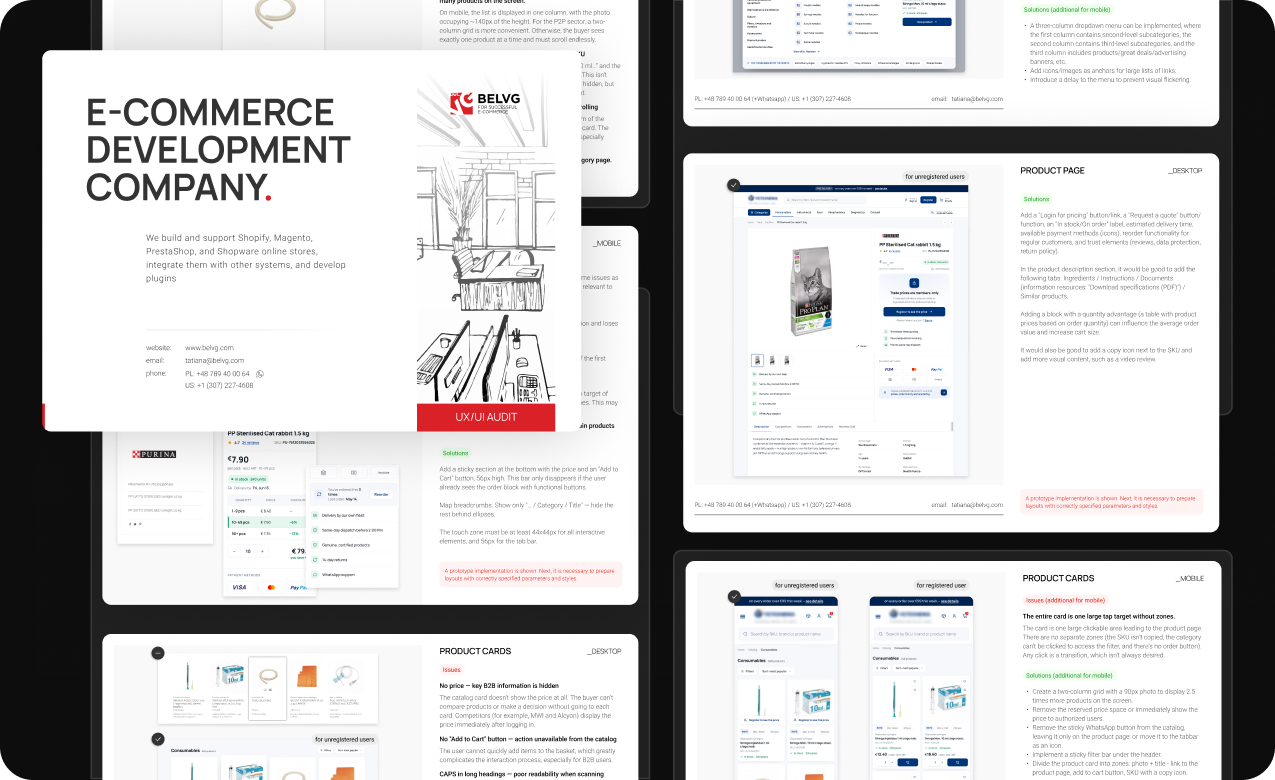
Example of a UX audit report showing prioritized findings
What Exactly Should Be Audited?
This UX audit checklist covers the areas most commonly reviewed in a website UX audit.
Navigation and information architecture:
- Can users find the main product categories within 5 seconds?
- Are menu labels clear and consistent with user expectations?
- Are breadcrumbs present on category and product pages?
Search and filters:
- Does the site search return relevant results for common queries?
- Can users filter by multiple attributes simultaneously?
- Are filter selections visible and easy to remove?
Site pages:
- Is the primary CTA visible without scrolling on mobile?
- Are product data, images, variants, and pricing clearly presented?
- Do trust signals (reviews, return policy, badges) appear near the purchase decision?
Mobile responsiveness:
- Are tap targets at least 44×44px?
- Does the checkout work end-to-end on a current iOS and Android device?
- Are any key elements cut off or overlapping on common mobile screen sizes?
Performance and trust:
- Does the page load in under 3 seconds on a standard mobile connection?
- Are security badges, payment icons, and return policy links visible at checkout?
- Do broken links or 404 errors appear during key user journeys?
Checkout and cart:
- How many steps are in the checkout flow? Are all necessary?
- Is the shipping cost shown before the final step?
- Are error messages on form fields specific and helpful?
For a deeper look at what a good cart user experience looks like in practice, see shopping cart best practices.
How to Document UX Audit Findings
Each finding in a user experience audit report should be self-contained. In other words, a stakeholder who was not part of the audit should be able to read, understand, and act on it.
Each issue is documented across six fields:
- Issue. A precise description of what is wrong, specific enough to act on without a follow-up. Not “the mobile UX needs improvement” but “the checkout CTA is not visible on mobile without scrolling”.
- Evidence. The data that supports the finding includes a heatmap screenshot, a session recording timestamp, and an analytics drop-off figure.
- Impact. It should highlight the business outcome this issue affects. It may be conversion, revenue, session depth, or task completion.
- Severity. Rated as critical, major, or minor depending on how significantly it blocks user progress.
- Recommendation. Description of what to change and how, written specifically enough for a developer to scope without a follow-up.
- Effort. It’s a practical estimation of what the fix requires: low, medium, or high.
In practice, a single entry might look like this:
- Issue: “Add to Cart” button is below the fold on mobile product pages.
- Evidence: heatmap shows zero interaction in the bottom 30% of the page.
- Impact: blocks the primary conversion action on mobile, which accounts for 64% of sessions.
- Severity: critical.
- Recommendation: move the button above the fold and increase the tap target to 48px minimum, following established ecommerce product page design tips for mobile-first conversion paths.
- Effort: low.
What a UX Audit Report Looks Like
A professional UX audit report gives every stakeholder a clear picture of what is wrong, why it matters, and what to do about it.
A strong user experience audit report structure:
- Executive summary with top 3-5 issues with brief business impact statements.
- Audit scope and objectives that highlight what was reviewed and why.
- Methodology, or which methods were used and why.
- Key findings with evidence in the form of the full issue list with screenshots, data, and annotations.
- Severity prioritization matrix and impact rating, with each finding rated by severity and business impact.
- Actionable recommendations that describe specific, actionable fixes for each finding.
- Priority order that covers quick wins first, then structural improvements.
- Suggested next steps and ownership to clarify who does what, and in what sequence.
Deliverable formats vary. The report can be delivered as a PDF, a structured presentation, or a Notion/Figma document. What matters is that it is readable by non UX designers and usable by developers.
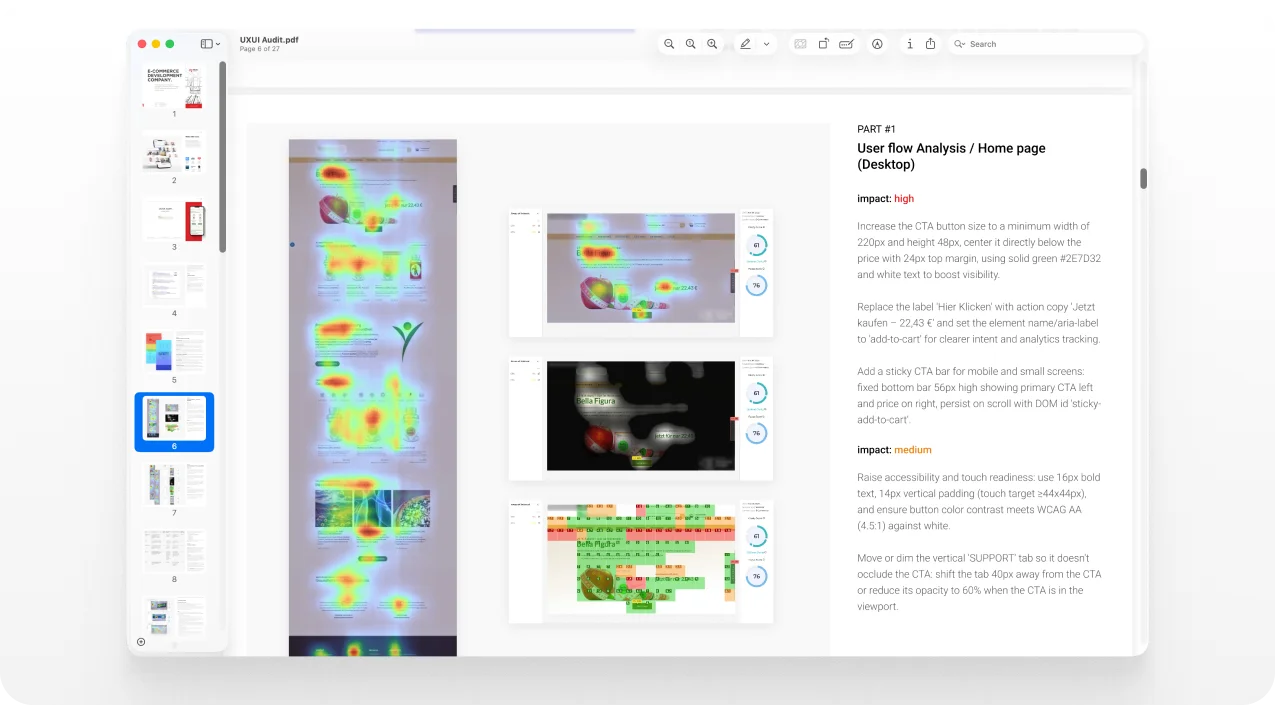
UX audit PDF report example
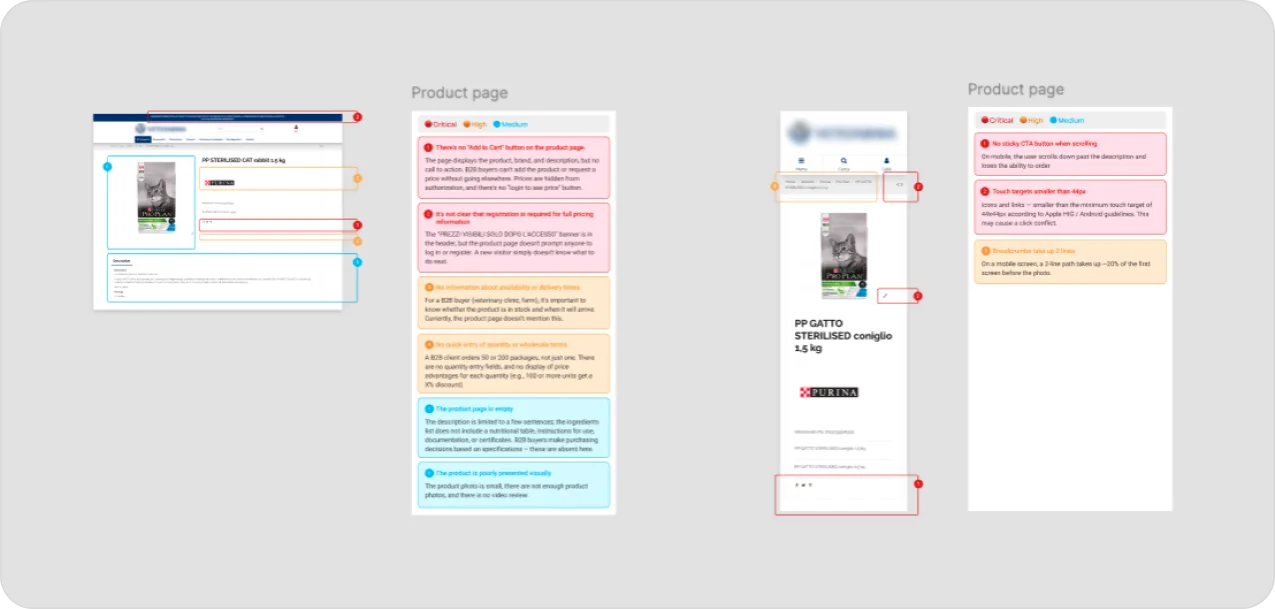
UX audit Figma report example
The duration of a user experience audit depends on the scope. A quick, focused review of one flow takes 1-2 days. A full site-wide audit can take several weeks.
Real UX Audit Example: BelVG
The example below comes from a UX audit BelVG conducted on its own Magento development services page. It’s useful precisely because the findings were not obvious to the team working on it every day.
What Main Problem Was Identified
Heatmap and scroll map data showed that user attention dropped sharply after the first screen. One of the most commercially important blocks on the page, the services section, was being skipped. CTA buttons received almost no clicks.
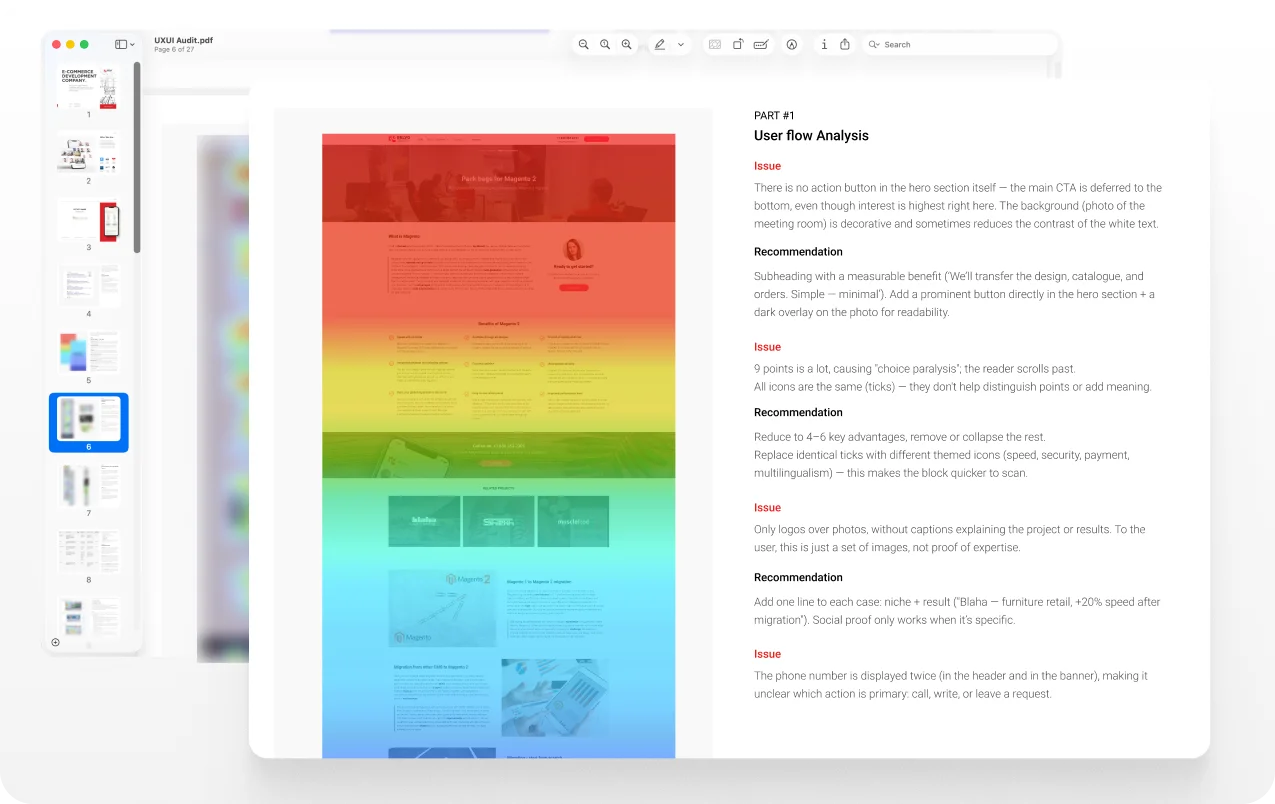
The heatmap shows a drop-off before the Services section
Hotjar scroll maps confirmed that most users never scrolled past the hero block. Attention maps showed near-zero concentration on service descriptions and CTA buttons.
Contrast map analysis revealed inefficient contrast between text and background in the services section. It made the section effectively invisible to a user scanning at normal speed.
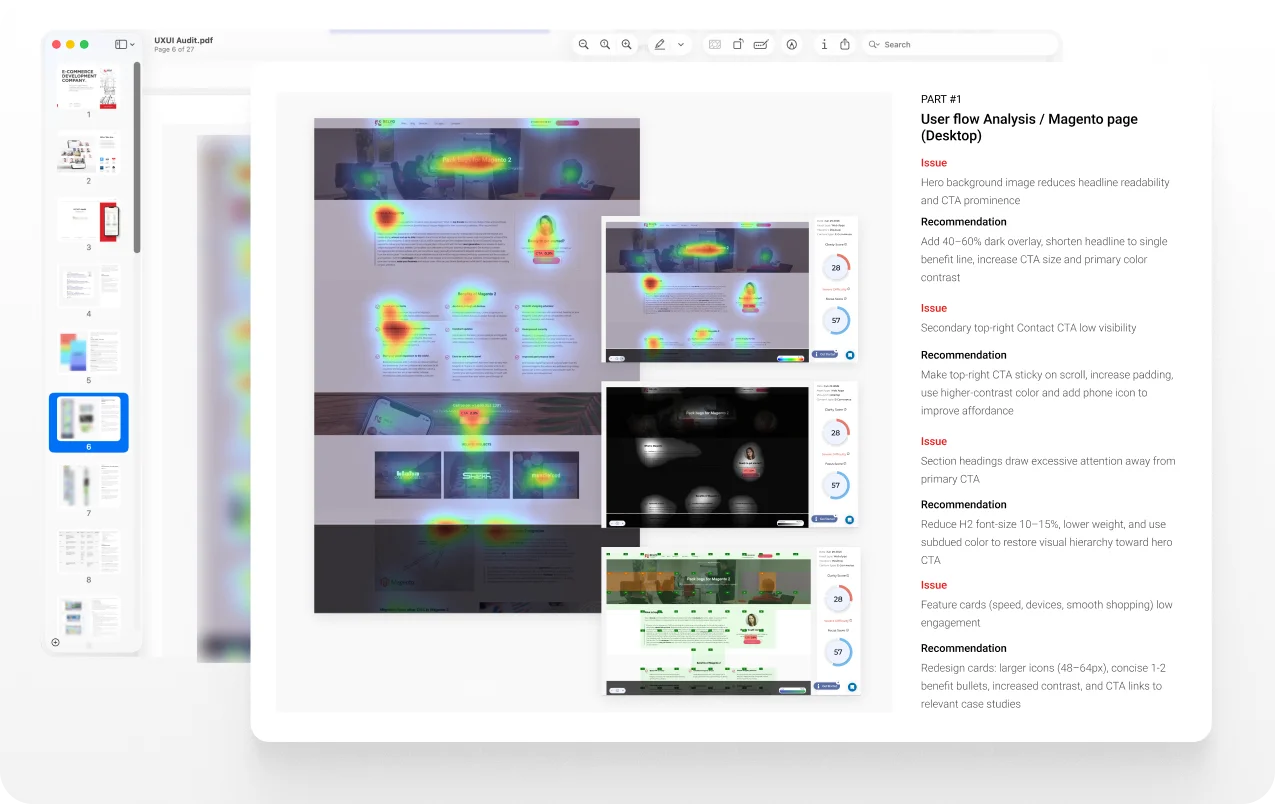
Fragment of the UX report, highlighting heat and contrast maps
This analysis led to clear recommendations:
- Clean up the hero background to reduce visual noise and improve CTA contrast.
- Increase heading sizes to create clear scroll anchors between sections.
- Restructure the services block. Replace the static three-column grid with a more dynamic layout and increase text contrast.
- Extend the navigation dropdown to full screen width so the busy background no longer competes with menu items.
Coming to the Results After the UX Audit
These findings came from a single review of the Magento development services page using Hotjar, AttentionInsight, and Google Analytics, combined with a structured survey of new and returning visitors. None of them required a redesign.
The recommendations were implemented on the BelVG service page. As a result, engagement metrics improved measurably. Based on before/after comparison tracked in Hotjar and GA4 over the 60 days following implementation:
- Scroll depth increased from 35% to 62%.
- CTA click-through rate rose by 28%.
- Engagement moved from near-zero interaction to consistent click activity across sessions.
- Qualified leads from organic traffic grew by an estimated 15-17% over the following quarter.
Note: figures reflect performance on the BelVG Magento development service page. Measurement period and baseline may vary, and results depend on the starting point, implementation quality, and traffic volume.
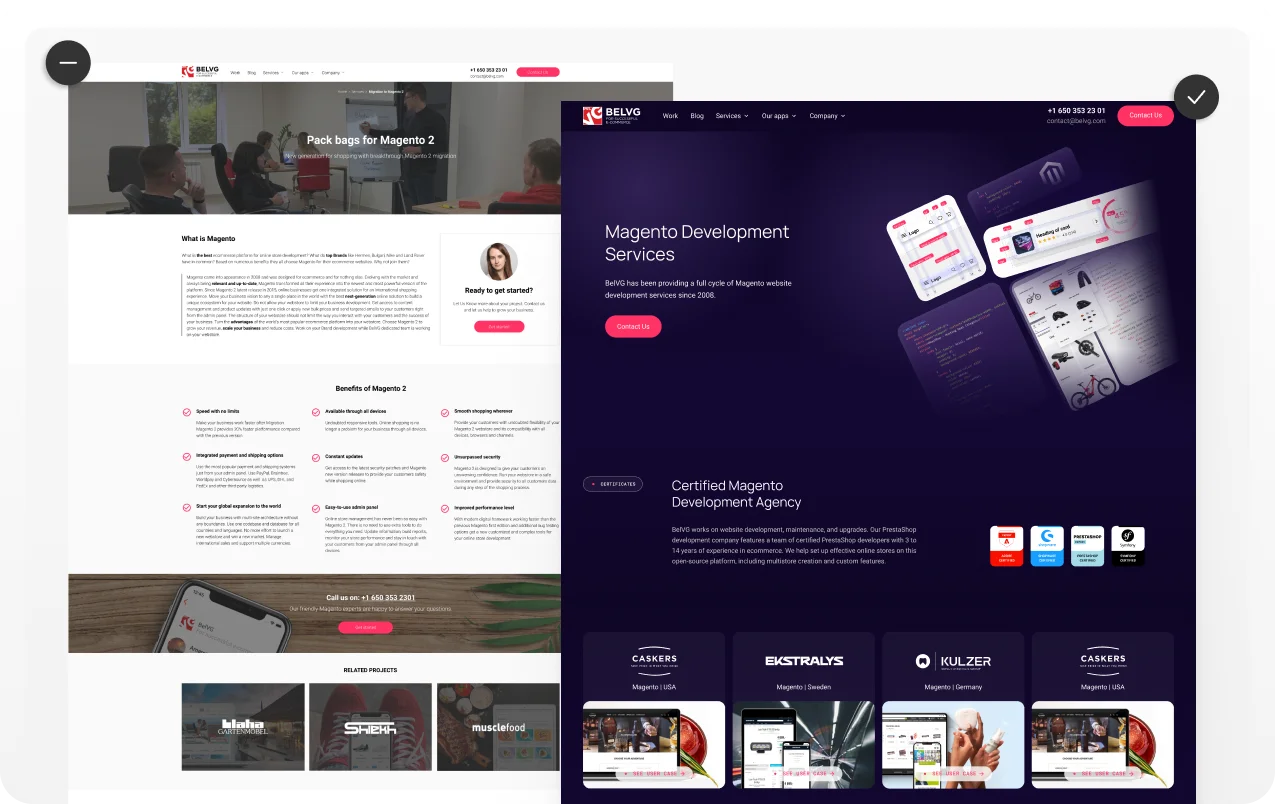
Before and after UX improvements
Common UX Audit Mistakes to Avoid
Even a well-intentioned audit can produce findings that go unused. These are the most common reasons it happens:
- Starting without a defined goal. An audit without a business question produces a list of issues without priorities.
- Relying on opinions instead of data. “I don’t like how this looks” is not a UX finding. Every issue in the report should have evidence: a screenshot, a data point, a user recording.
- Skipping prioritization. A list of 40 unranked issues is not actionable. Prioritization must be made by severity and business impact so the team knows where to start.
- No stakeholder alignment before the audit. If the decision-makers don’t agree on what the audit is measuring, the report will be contested rather than acted on.
- Producing a report with no implementation logic. A report that lists problems without ownership, effort estimates, or a suggested sequence is unlikely to move to implementation.
- Collecting findings without severity ranking. Treating a missing alt text and a broken checkout as equal problems misallocates fix resources and erodes trust in the audit’s value.
Conclusion: What a UX Audit Can Do for Your Store
A UX (user experience) audit gives you a clear explanation of why users leave without making a purchase. It connects bounce rates, drop-offs, and abandoned carts to the specific friction points causing them.
BelVG provides UX audit services for ecommerce stores. For your store, you get:
- A prioritized report with findings, evidence, and severity ratings.
- Clear recommendations tied to conversion, revenue, and retention impact.
- A suggested implementation sequence with quick wins and structural fixes.
- A deliverable that your developer, product owner, and marketing team can all act on.
If you want to understand what an audit of your store would cover, what it costs, and what you’d receive at the end, email our team with your site URL, and we’ll outline the scope.
Download the full diagnostic checklist.
 UX Audit Checklist
Sources:
- Revenue losses for businesses by BusinessWire
- Baymard UX statistics
- Distribution of retail visitors and orders worldwide by Statista
- Conviva’s 2025 State of Digital Experience Report
- Ecommerce checkout usability report and benchmark
- PWC report: customer experience
- Ten usability heuristics
- Web Content Accessibility Guidelines (WCAG)
- Core Web Vitals
- UX statistics and insights