


As an online store owner, you might not understand why your marketing isn’t generating sales despite high website traffic.
One of our clients at BelVG faced this exact issue: good traffic from SEO and social media, but low sales. To address this, we analyzed their website page by page to identify where users dropped off during purchasing.
The outcome was a comprehensive report that included heatmaps, an overview of the user journey, and a list of UX, technical, and functional issues that could affect the store’s conversion rate. This analysis is called a CRO Audit.
Table of contents:
What is a Conversion Rate Optimization (CRO) Audit
The Strategic Power of a Conversion Rate Audit: More Than Just Tweaks
What You Gain: The Real Results of a CRO Audit for Ecommerce Business
When to Conduct a CRO Audit for Your Ecommerce Business
How to Make a CRO Audit: A Step-by-Step Process for Ecommerce Owners
The Essential Toolkit for Your Ecommerce CRO Audit
What is a Conversion Rate Optimization (CRO) Audit
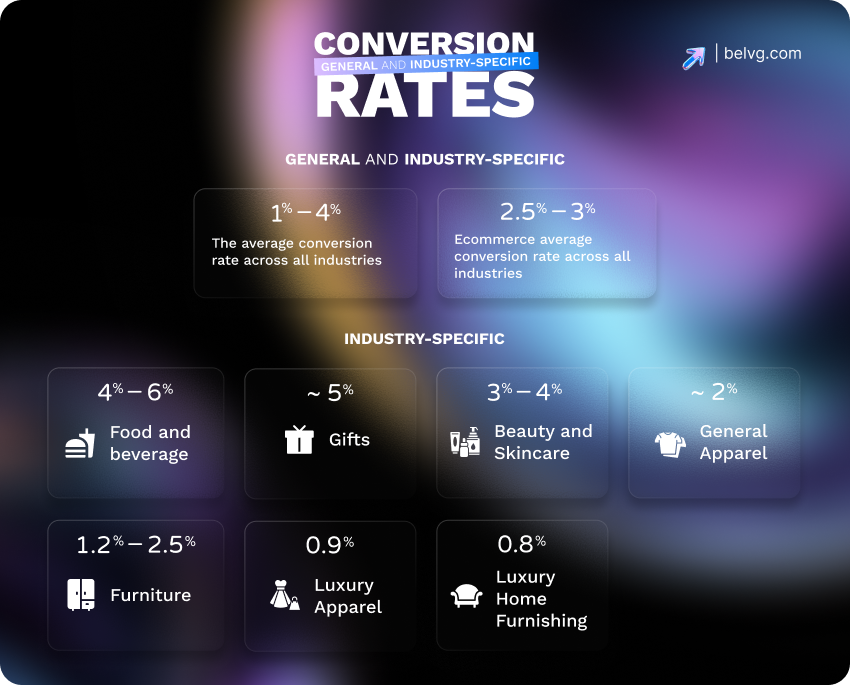
The average website conversion rate is typically from 1% to 4%. In ecommerce, this number is more precise, ranging from 1,5% to 3%. However, the statistics vary greatly depending on the specific industry and the type of business (B2B, B2C, etc). You need a website CRO audit if these numbers are lower for you.
A Conversion Rate Optimization audit is a deep, data-driven review of your website. It’s designed to uncover why visitors don’t take key actions like buying a product, signing up for a newsletter, or filling out a form. These are the actions to which conversion rate typically refers. For ecommerce sites, it maps customer paths and pinpoints where they drop off, affecting the conversion rate.
After the audit, you’ll get a report detailing the customer journey and actionable technical and UX improvement recommendations.
The Strategic Power of a Conversion Rate Audit: More Than Just Tweaks
A CRO audit might sound technical, but it’s a deep dive into your website’s performance. It shows what’s working and what’s not, acting like a health check for your online store. When done correctly, a CRO audit can maximize conversion rates, improve user engagement, and address specific issues, like in the example below.
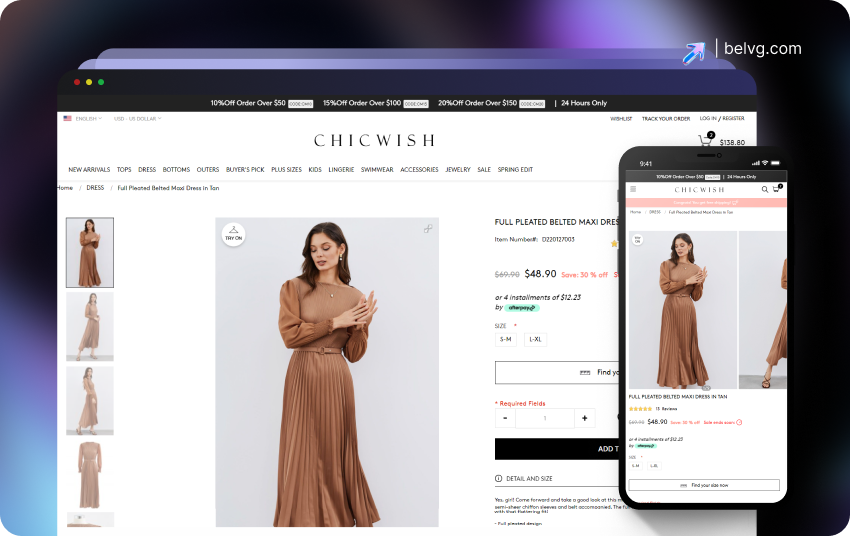
Chicwish Return Fix
Chicwish faced high product returns, mainly because of incorrect sizing, as Chinese sizes differ from US and European sizes. They also had a rigid, inefficient return process.
Frequent returns affected revenue, overwhelmed support, and decreased customer satisfaction, especially across multiple international markets.
We conducted a CRO audit, and the solution to Chicwish’s returns problem became clearer. Together with the client, we developed a plan to solve it. It mostly consisted of integrating new features:
- “Find Your Size” quiz recommends accurate sizes based on body measurements, helping customers choose the right fit.
- Video on the product page helped visitors better understand the quality and fit of the clothing items.
- Integration with Style. SDK. It helped to generate a 3D model of the buyer to better understand how the item fits specific body types and choose the correct sizing.
- Implementation of region-specific return flows and automated courier label generation. These features smoothed returns and reduced friction.
As a result, Chicwish saw a marked decline in size-related returns and improved overall shopping experience.
Proper conversion audits go beyond fixing minor issues; they are comprehensive assessments that influence all aspects of your business.
What You Gain: The Real Results of a CRO Audit for Ecommerce Business
A successful CRO audit yields significant outcomes that influence your profits, user engagement, and overall business strategy.
Here’s a straightforward look at the tangible benefits you can expect.
1. Direct Boost to Your Sales & Revenue
This is often the most exciting outcome for any Ecommerce owner, and with a CRO audit, you can see the changes quickly.
- More Conversions from Existing Traffic. This audit helps you convert more website visitors into paying customers, boosting sales without increasing ad spend.
- Fewer Abandoned Carts. A CRO audit identifies the pain points behind shopping cart abandonment. It results in fewer abandoned carts and, consequently, more completed sales.
- Higher Return on Investment (ROI). You’ll get more value from your website traffic and marketing efforts by focusing your resources on what drives revenue.
After implementing audit findings, many sites experience a conversion rate increase of 20% to 100% or more.
2. Deeper Understanding & Clearer Strategy
A CRO audit isn’t just about fixing problems and gaining knowledge.
- Clear Picture of Your Website. You’ll understand precisely what’s working well and what needs improvement on your site.
- Insight into Your Customers. You will learn key trends across various devices, regions, and seasons. Additionally, you’ll discover who your most valuable customers are and what influences their behavior.
- A Roadmap for Future Growth. The audit provides numerous ideas for future enhancements and measurable results. It offers a clear strategy for optimizing your homepage, product pages, and calls to action.
These insights result in better homepage layouts, product page content, and calls to action based on actual user behavior.
3. Improved User Experience (UX) and Customer Satisfaction
A smooth shopping experience keeps customers coming back.
- Better Customer Experience. Fixing frustrating aspects of the user journey makes your website easier and more enjoyable.
- Increased Customer Satisfaction. A website that is easier to use leads to happier customers.
- Increased Customer Lifetime Value (CLV) & Retention. Happy customers are more likely to return, make repeat purchases, and become loyal advocates for your brand, which increases their overall value to your business.
Making minor adjustments, like simplifying your checkout process or clarifying product descriptions, can significantly influence how customers view your brand.

Get Your Ecommerce Checked
Improve your Ecommerce conversions by up to 34% with our expert UX Audit Services.
Learn More4. Greater Operational Efficiency
Making data-driven decisions reduces guesswork and saves you money.
- Data-Backed Decisions. Every change you make is backed by reliable data, reducing the risk of costly mistakes.
- Focus on High-Impact Areas. The audit identifies key areas for maximum resource efficiency.
- Potentially Lower Costs. A clear improvement strategy will help cut development costs and lower customer acquisition and handling fees.
- Team Alignment. Decisions based on objective facts from the audit help create consensus among your team and reduce disagreements.
The result are lower costs, higher returns, and less team friction.
5. Competitive and Strategic Advantage
Stay ahead in the fast-paced Ecommerce world.
- Clear Growth Path. You’ll have a clear, testable strategy for future site improvements.
- Stay Competitive. Continuously optimizing your conversion rates enables you to adapt and outperform competitors in your niche.
- More Effective Ad Campaigns. Optimizing your landing pages increases the efficiency of your PPC campaigns and leads to better results.
- Peace of Mind. With data backing your sales and marketing decisions, you can feel confident and at ease, knowing your strategies are founded on solid ground.
Over time, this positions your business to be quicker, smarter, and more flexible than others in your industry.
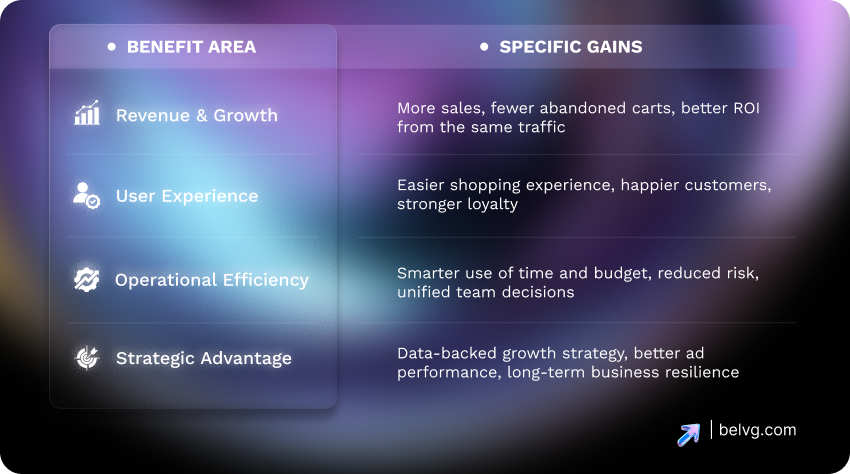
A CRO audit is a powerful strategic tool for your digital business. It helps you grow faster, spend wisely, and improve customer service. All without needing more traffic.
When to Conduct a CRO Audit for Your Ecommerce Business
Ecommerce business owners must know when to conduct a Conversion Rate Optimization (CRO) audit. Timing is key to allowing quick adaptations and maximizing every visitor’s potential.
There are two main approaches to CRO audit timing: regular, proactive audits and event-driven conversion audits.
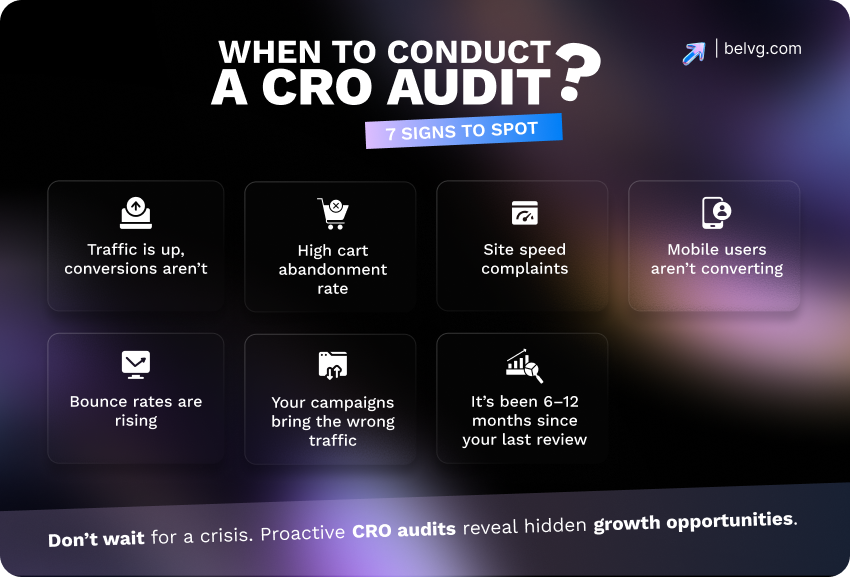
Regular, Proactive Conversion Audit: Your Ecommerce Health Check
To keep your ecommerce site in top shape, conduct a CRO audit on your Ecommerce site every 6 to 12 months as part of your digital strategy.
Why it matters:
- Prevents minor issues from growing into major problems
- Identifies underperforming areas
- Maintains a strong website conversion rate compared to the competitors
- Adapts to changes in customer behavior, industry trends, and your own business goals.
View it as essential maintenance for your vehicle, which is necessary for peak performance.
Event-Driven CRO Audits
In addition to regular website conversion audits, specific key business events require a CRO audit to ensure your website converts visitors effectively.
- After and Before Launching a New Website or Product
A pre-launch audit is crucial for optimizing the user experience for sales. After a few months, perform a post-launch conversion audit to identify and fix issues as real customers begin using the product and initial excitement wears off.
- After Major Website Changes
Redesigns, navigation updates, and new features impact user experience. A CRO audit confirms these changes improve conversions instead of harming them.
- When You Notice a Drop in Conversion Rates
A sudden dip or significant changes in paying customers are red flags. An audit can help identify and resolve the root causes.
- After Sudden Changes in Traffic
If your traffic suddenly increases or decreases, an conversion rate audit will clarify why this is happening and how you can optimize your site to adapt.
- When Setting New Conversion Goals
If your business sets new objectives, such as more newsletter sign-ups or a higher average order value, a CRO audit can help align your website’s structure and content with these goals.
- Before Major Campaigns or Seasonal Promotions
An audit assures that your landing pages, CTAs, and funnels are optimized for maximum conversion before significant events like Black Friday, holiday sales, or promotions.
- When Best Practices Aren’t Working
If you’ve tried all the generic tips and still aren’t seeing results, it’s time for a custom CRO audit to identify the issue.
In essence, CRO is an ongoing process, not a one-time solution. Use a mix of regular and event-triggered tactics to keep your business customer-focused and ready to convert, regardless of the challenges you face.
How to Make a CRO Audit: A Step-by-Step Process for Ecommerce Owners
You’re on the right track if you believe a Conversion Rate Optimization audit can boost your sales. A CRO audit goes beyond just analyzing numbers; it’s a structured process that helps you understand your customers and optimize your website for higher conversions.
Here’s a description of a proper CRO audit process. It shows how to carry out a complete CRO website audit and can be used as CRO audit checklist.
Step 1: Conversion Goals Setting
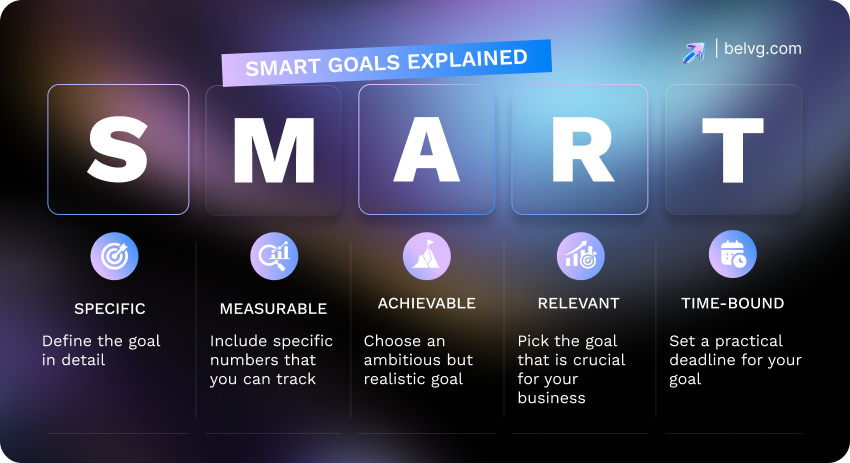
Before diving into data, define what success looks like and be SMART. Meaning, your conversion objectives would be:
- Specific: e.g., reduce cart abandonment by 15%
- Measurable: trackable through analytics
- Achievable: be optimistic but stay realistic
- Relevant: aligned with business priorities
- Time-bound: achievable within a set period
Example: Reduce shopping cart abandonment by 15% in the next quarter.
Separate your goals into macro conversions (purchases, signups) and micro conversions (adding to cart, email opt-ins, product page views). This will help you identify where your target audience loses interest in the conversion process.
You can identify key performance indicators from clear conversion goals for your business. KPIs may include bounce rate (mobile vs. desktop), page load times, scroll depth, form conversion rates, product page conversion rates, cart abandonment rate, average order value, and click-through rates.
Step 2: Data Gathering and Validation
Collect all the information you can. This is the foundation of your audit. Gather both quantitative and qualitative data to understand user behavior and motivations.
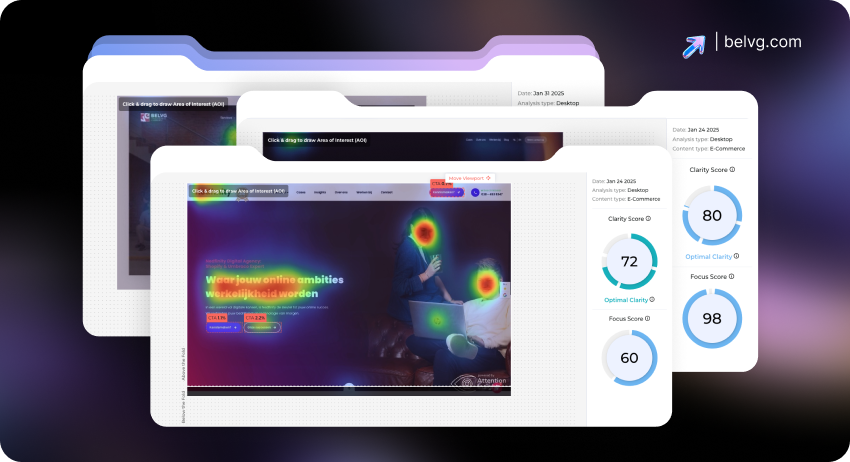
Gather Quantitative Data (What is happening):
- Website analytics (Google Analytics): traffic sources, bounce rates, conversion metrics
- Funnel analysis: drop-offs at key stages
- Heatmaps and session recordings: user engagement metrics
- Form abandonment stats
- Device and browser breakdowns
Gather Qualitative Data (Why it’s happening):
- On-site surveys and polls
- Customer reviews and support tickets
- Usability testing sessions
- Interviews or user testing recordings
Check that your data collection tools are working correctly. Wrong data leads to wrong conclusions.
Step 3: Conversion Funnel Analysis
Conversion funnel represents a visualization of your customer’s journey from their first interaction with your brand to completing the conversion action, such as making a purchase.
In this step, you must analyze and identify how users visit your website and where they leave.
First, you need to analyze key conversion funnel stages:
- Awareness (landing pages, blog posts, search)
- Consideration (category, product pages)
- Interest (add to cart, trial signup)
- Conversion (checkout or payment)
- Post-purchase (thank-you page, retention efforts)
Then, map the user journey: analyzing user behavior, chart out every step a website visitor takes from first encountering your brand to making a purchase or leaving.
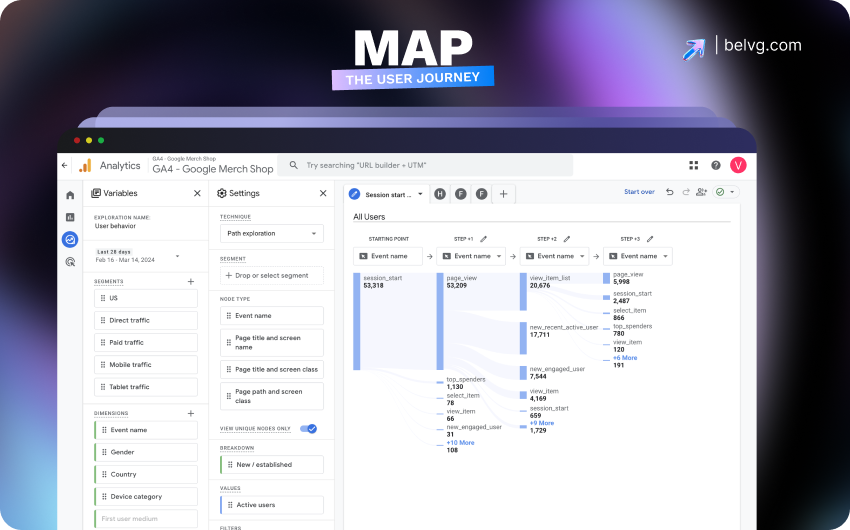
Identify drop off points and focus on them. Start at the bottom of the funnel, where revenue is lost fastest.
Example: If many users drop off between viewing a product and adding it to their cart, you might have issues with product information or pricing clarity.
Combine Data. Use funnel analysis to find drop off points, and complement this with heatmaps and session recordings to understand why. The result is a conversion funnel report that shows a complete picture.
Step 4: Key Ecommerce Page Audit
Not all web pages are equally important. Identify and analyze your top landing pages and those with high conversion rates. Focus on the pages that drive sales, which are critical for most e-commerce businesses.
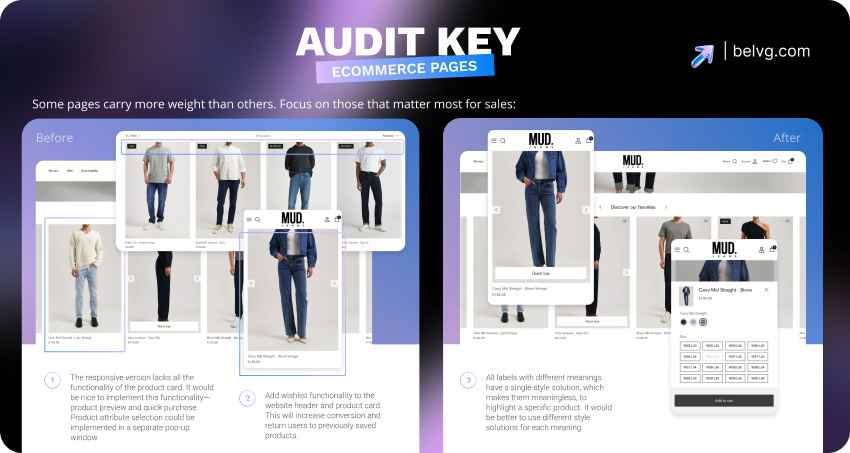
- Homepage: Check if the value proposition is clear in 5 seconds, conduct a speed test, ensure navigation is simple, check the visibility and relevance of CTAs, and check if the footer includes essential links.
- Category Pages: Check if filters and sorting options are user-friendly and if product listings offer clear information, pricing, and visuals.
- Product Pages (PDPs): Check the benefits and product descriptions. If there is social proof, ensure shipping, returns, and guarantees are easy to find. Consider usability, for example, using button selectors instead of dropdowns for sizing.
- Cart and Checkout Page: Make sure there are no unnecessary steps or hidden costs, include guest checkout, and check if users can edit information easily.
- On-Site Search: Check if your search bar is easy to find and use, and if it handles different types of queries.
Each page should build trust, reduce friction, and guide users toward conversion.
Step 5. User Experience (UX) Audit
This crucial step emphasizes the intuitiveness, ease, and satisfaction of your website for users.
Key areas to check:
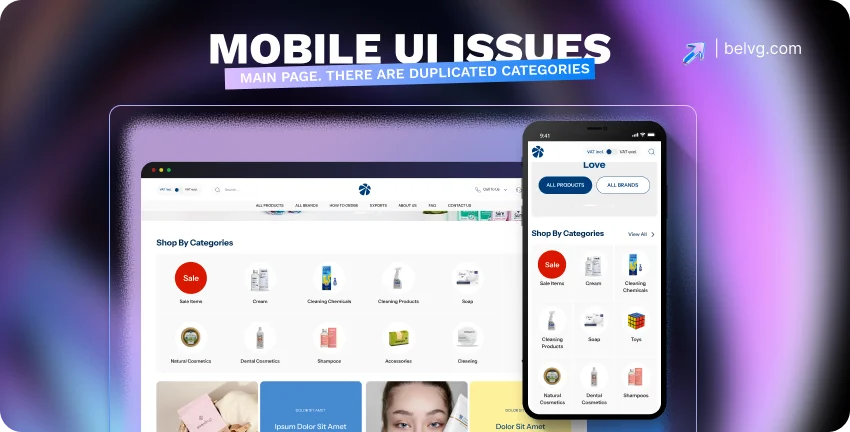
- Navigation. Check if the information is straightforward to navigate across menus and links. Are shopping links given priority?
- Design and Layout. Evaluate whether your site is visually appealing and matches your brand. Check the quality of your images and other media elements.
- Mobile Devices View. A tremendous percentage of sales happen on mobile, so make sure your website uses specific keyboard layouts (numeric for phone numbers) and that tapable elements are adequately spaced.
- Overall User Flow and Psychology. Try to think from your users’ point of view and decide if the site is easy for a new site visitor to understand. What’s causing immediate bounces or abandoned carts?
How to conduct it:
- Usability Testing. Observe real customers as they navigate your site, asking them to “think aloud.” This exposes genuine challenges they encounter.
- User Feedback. Conduct surveys and interviews to identify their needs, frustrations, and motivations.
- Competitive UX Analysis. Analyze what your competitors excel at or struggle with regarding user experience.
Step 6: Technical Audit
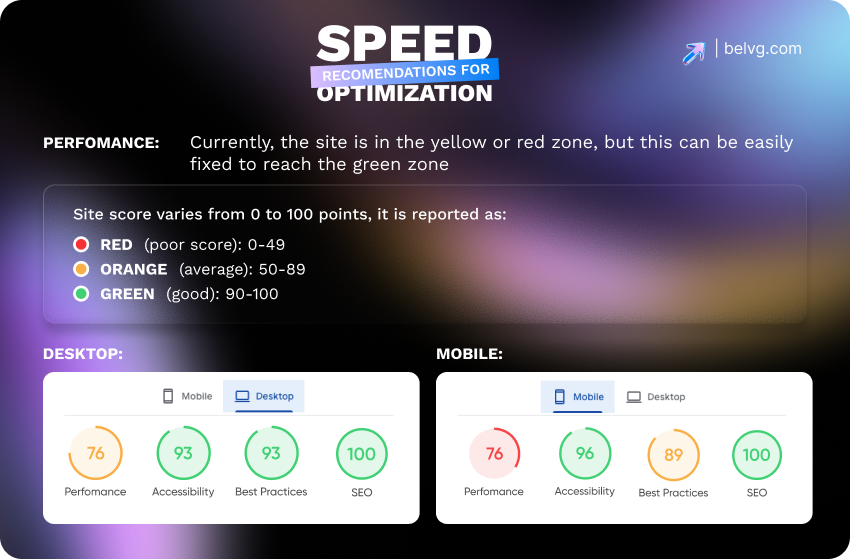
Identify and resolve technical issues that negatively impact usability and disrupt the purchasing experience.
Key areas to check:
- Site Speed. Check the load times of all your landing pages on different devices. Optimize images, scripts, and server responses.
- Mobile Responsiveness. Make sure that no bugs occur on smartphones and tablets.
- Website Bugs. Identify broken links, form errors, or visual glitches.
- Form Functionality. Check that all forms work smoothly without blocking submissions or confusing users.
Minor technical issues can lead to major delays. This step secures your foundation.
Step 7: Conversional SEO Audit
While SEO is often about getting found, certain SEO aspects directly impact whether visitors convert once they arrive.
Key areas to check:
- Meta Titles and Descriptions. Check if the snippets in Google search results align with the page content and expectations. Misleading titles can cause quick bounces and result in lost conversions.
- Traffic Source Relevance. Irrelevant keywords won’t convert. Align your SEO traffic with your product or service offerings.
- Site Speed. Here we go again. A fast site benefits users and is also a key SEO ranking factor. It enhances engagement and conversion potential, so we emphasize it repeatedly.
High-quality traffic is just as important as high volume. It makes sure you attract buyers.
Step 8: Content and CTO Audits
Your website’s content and visuals act as your sales pitch. Make sure your messaging effectively communicates value, addresses potential objections, and guides users through the buying process.
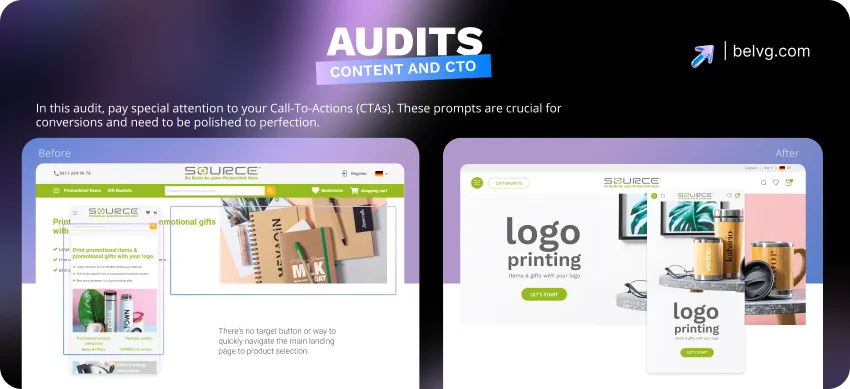
In this audit, pay special attention to your Call-To-Actions (CTAs). These prompts are crucial for conversions and need to be polished to perfection.
Key areas to check:
- Value Proposition Clarity. Check if benefits are clear within seconds of landing.
- Information Hierarchy. Make the content easy to scan and well-structured.
- Persuasive Copywriting. The copy should focus on the customer’s needs and desired outcomes.
- Social Proof. Reviews, testimonials, and guarantees should be near conversion points.
- Completeness. Verify the accuracy of the details regarding the product or service.
- Visible and Clear CTAs. Ensure that the call-to-action (CTA) buttons are easy to spot. The actions should be clearly described (for example, “Submit” or “Subscribe”), and the CTAs must be aligned with the page’s content. Place them strategically above the fold, near relevant information, and close to purchase decisions.
- Interruptive CTAs (Pop-ups). If you use them, time them strategically to avoid annoying users and harming conversions, such as on exit intent or after a specific time on the page.
Effective content informs and persuades, fostering trust and driving action. CTAs are crucial for encouraging conversions and must be both effective and noticeable.
Step 9: Hypotheses Creation and Prioritization
We have now gathered a good amount of the analytical data related to your website. Having researched them, you might have already noticed some patterns and connected some dots.
For example, you may have noticed that many users abandon their purchases at the checkout. Analytics show that most exit after the fifth step, indicating the process may be too complicated. Here you can formulate a hypothesis:
Reducing the checkout process to 4 steps will reduce the number of dropoffs by 10%.
Generate multiple hypotheses for each webpage element. Prioritize testing and implementing those that are simple to execute but deliver high impact, typically tasks from the lower part of the conversion funnel with the strongest revenue effect.
Step 10. Change Testing
Now it’s time to test your hypotheses. To do it, you can use two approaches:
- A/B Testing. Compare two versions of a page or element (e.g., a new headline vs. the old one) to see which performs better.
- Multivariate Testing. Test multiple changes at once on a single page.
Changes should only be made when the test results are statistically significant, meaning the positive outcome isn’t just due to chance.
Step 11: Analization and Implementation
Implement the change if your hypothesis is proven. If not, analyze why, form a new hypothesis, and test again. Use this cycle to continuously refine your site based on real user behavior and measurable long-term outcomes.
The Essential Toolkit for Your Ecommerce CRO Audit
A CRO audit can significantly improve your e-commerce business. Implementation of these steps will reduce friction, build trust, and guide users from visit to purchase.
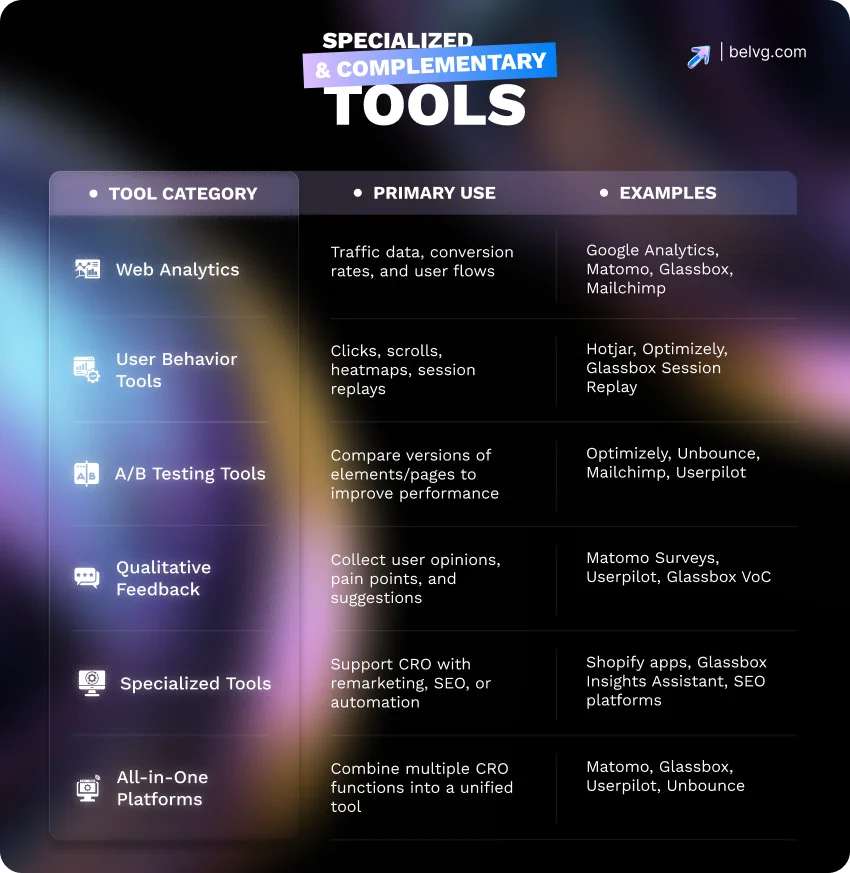
To perform an effective Conversion Rate Optimization audit, use the right tools alongside asking the right questions. These tools help you analyze user interactions, pinpoint user pain points.
Here’s a list of the essential tools you will need.
1. Analytics Tools: Your Website’s Dashboard
These tools are essential for understanding what users do: your website’s performance data.
What they do.
They track where your visitors come from, who they are, how many convert, where they leave, and how they navigate your site.
Examples for Ecommerce:
- Google Analytics. The most common and widely used tool for website data.
- Matomo. A privacy-friendly alternative that often includes built-in audit features.
- Specialized Ecommerce Analytics. Tools like those offered by Glassbox, such as Customer Journey Analytics and Product Analytics, or Mailchimp’s customer insights, can provide specific insights relevant to your store.
2. User Behavior Analytics Tools: Seeing How Customers Interact
These tools help you visually understand how users engage with your site, beyond just the numbers.
What they do.
They display where users click and how far they scroll, and they even record their entire sessions. This lets you identify confusing areas, overlooked elements, or spots where customers get stuck.
Examples for Ecommerce:
- Heatmaps and Clickmaps (e.g., Hotjar, Heatmap.me, Optimizely). The tools visualize user behavior data, such as user clicks, mouse movements, and page scroll depth. You’ll see “hot” areas where users engage most and “cold” areas they ignore.
- Session Recording Tools (e.g., Hotjar). They allow viewing video replays of individual user sessions. It is like observing your website visitors as they navigate your store, revealing their exact paths and moments of frustration.
These tools allow you to identify often overlooked usability issues that numbers cannot explain alone.
3. A/B Testing & Experimentation Tools: Proving What Works
Test why one version of a page or element performs better than another. Once you hypothesize what might improve conversions, these tools allow you to test your ideas in a controlled manner.
What they do.
They let you show different versions of a page or elements, like buttons or headlines, to different visitor groups. This helps you identify which version converts better.
Examples for Ecommerce:
- General A/B Testing Tools (e.g., Optimizely) are widely used to compare two page versions.
- Multivariate Testing Tools. These are for testing multiple changes simultaneously on a single page.
- Integrated Solutions (e.g., Unbounce Landing Page Builder, Mailchimp A/B Testing). Some platforms offer A/B testing built directly into their features, which can simplify your workflow.
- Userpilot. Another tool with in-app A/B testing capabilities.
These tools help confirm the feasibility of ideas before implementing changes across the entire site.
4. Qualitative Feedback Tools
Another set of tools that shows why customers behave as they do.
What they do.
These tools collect direct feedback from users about their experiences, challenges, and suggestions. This human element is essential for understanding the motivations behind their actions.
Examples for Ecommerce:
- User Testing Tools. Watch real users complete tasks on your website and listen to their feedback.
- Survey Tools (e.g., Matomo Surveys, Userpilot). They collect direct feedback through pop-up or on-page surveys.
- Voice of Customer (VoC) Tools (e.g., Glassbox VoC). These systems are designed to gather customer sentiment and feedback.
5. Specialized & Complementary Tools
Beyond the core categories, other tools can round out your audit.
- Ecommerce Platform Specific Tools: Magento, Shopify, or Shopware offer various tools to aid CRO efforts.
- SEO Tools: While primarily for search engine optimization, they offer insights into competitor traffic, keywords, and how users find your products.
Conclusion
A CRO audit is essential for continuous growth. By analyzing your website’s performance, user experience, technical health, and content, you gain insights into what drives your customers.
Adopt CRO as an ongoing strategy to improve customer experience, maximize traffic, and succeed in a competitive market.