


PrestaShop 9 is the platform’s current major version. Released in June 2025, it brings an updated technical foundation, a new default theme, better integration options, and a safer upgrade path.
PrestaShop 9.1.5 is currently the recommended version for live stores, while PrestaShop 9.2 is available as a public beta for testing since July 2026.
The main benefits of PrestaShop 9 depend on your role:
- For store owners, it means a more modern platform with better performance, security, support for future upgrades, and improved overall store stability.
- For developers, PrestaShop 9 brings Symfony 6.4 LTS, newer PHP versions, a new Admin API, and a cleaner frontend stack. These changes make it easier to maintain the store, connect external systems, and build new features.
- For marketers, the new Hummingbird theme provides a mobile-first storefront with better SEO support and a faster, lighter frontend.
This guide explains what PrestaShop 9 offers today, what has changed since PrestaShop 8, and which updates can meaningfully impact your store. It also covers system requirements, upgrade considerations, and when moving to PrestaShop 9 makes sense for your business.
Table of Contents
PrestaShop 9 Release Date and Current Version
PrestaShop 9 Features
Benefits of PrestaShop 9
PrestaShop 9 vs PrestaShop 8
PrestaShop 9 Requirements
Should I Upgrade to PrestaShop 9?
PrestaShop 9 Upgrade: How the Process Works
Final Thoughts
PrestaShop 9 Release Date and Current Version
PrestaShop 9.0 was officially released on June 10, 2025, after about two years of development and community testing. Since then, PrestaShop has released several updates to fix bugs, improve security, and add new features.
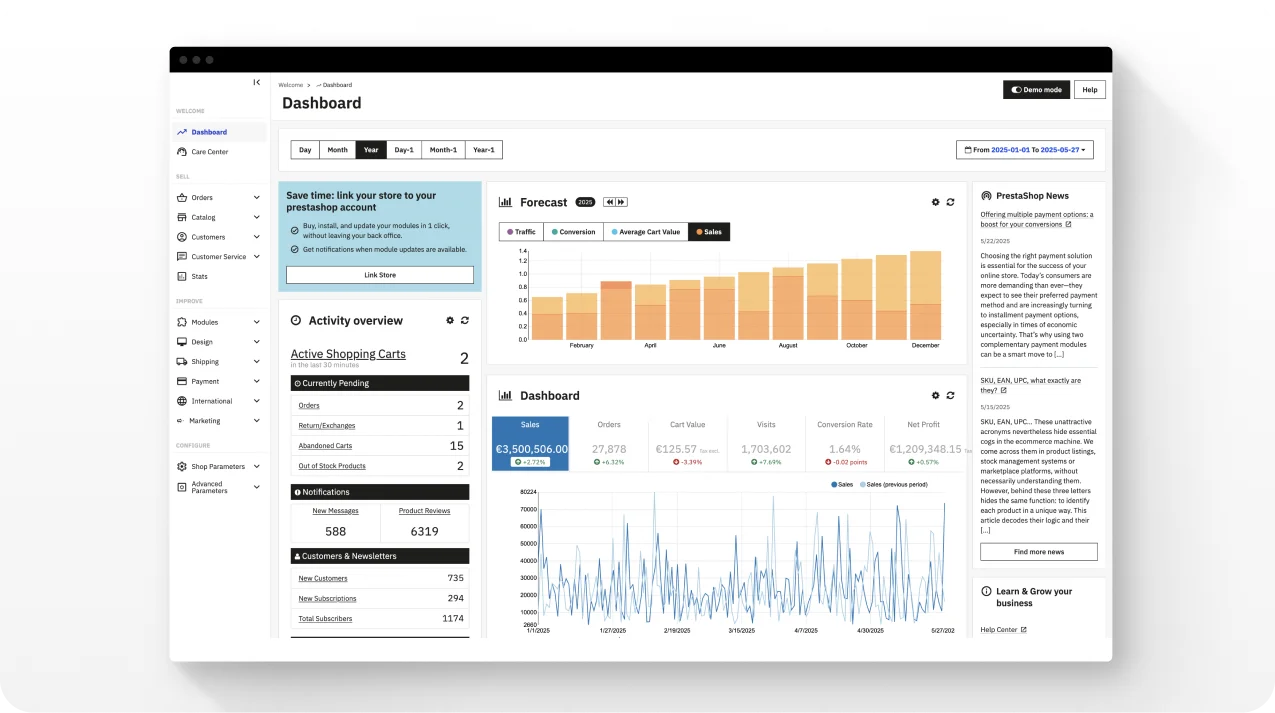
Source: https://build.prestashop-project.org/news/2025/prestashop-9-0-available/
PrestaShop 9.0 to 9.1: What’s Already Released
Here is what each PrestaShop 9 release means for your store:
- PrestaShop 9.0, released in June 2025. It was the main PrestaShop 9 upgrade. It introduced a newer technical foundation, support for PHP 8.1-8.4, a new Admin API for integrations, and the Hummingbird theme as an optional alternative to Classic. For merchants, the main changes are a newer platform foundation, modern API options, updated security controls, and a new storefront option.
- PrestaShop 9.0.1, released in October 2025. It was a maintenance update after the initial 9.0 release. It fixed bugs found in the first version. There were no major new features, but the update helped keep stores stable.
- PrestaShop 9.1, released on March 23, 2026. This release added more visible changes for merchants. Hummingbird 2.0 became the default theme, while the Classic theme remains available. It also improved accessibility and introduced experimental features for multi-carrier shipping and discounts. Both features remain behind feature flags.
- PrestaShop 9.1.1-9.1.5, released in April-August 2026. These smaller updates focused on bug fixes and security patches. One update fixed a critical cross-site scripting vulnerability. If your store runs PrestaShop 9.1, keeping it on the latest 9.1.x patch helps protect the store and keep it stable.
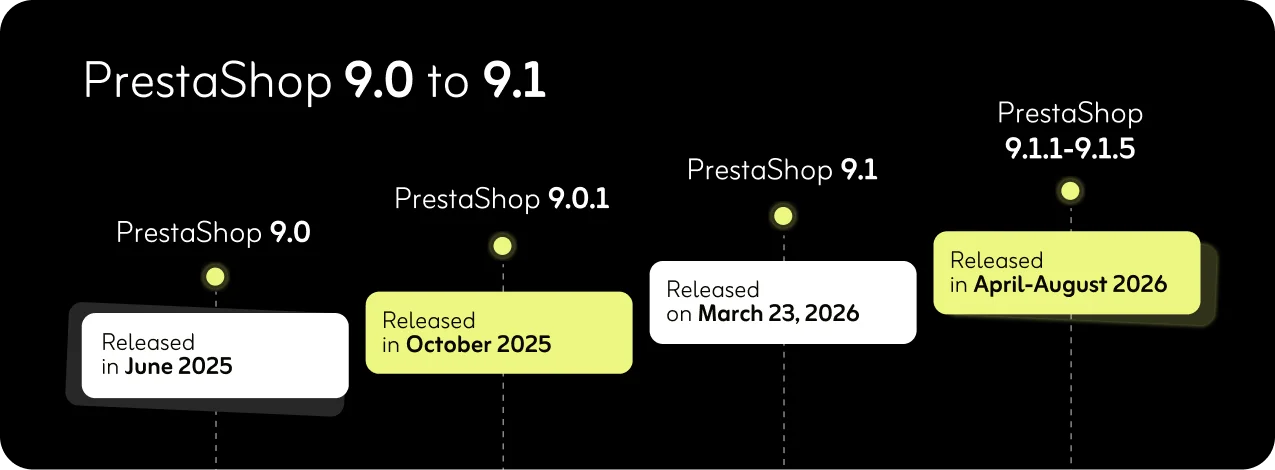
PrestaShop 9.0-9.1 release timeline
Caption: PrestaShop 9.0-9.1 release timeline
If your store still runs PrestaShop 8, you are not required to upgrade immediately. The 8.2 branch receives security updates and critical fixes, but no new features. It gives you time to plan the move to PrestaShop 9 and check your theme and modules for compatibility.
PrestaShop 9.2: What’s Available for Testing
The next major step is PrestaShop 9.2. The first beta was released on July 22, 2026. This version is available for testing but is not ready to use for a live store.
PrestaShop 9.2 previews several features that could matter to merchants:
- One page checkout. A native checkout option designed to reduce the number of steps customers need to complete a purchase.
- “Ask AI” assistant. An AI-powered assistant inside the back office. It lets merchants ask questions about store data and perform actions using natural language.
- Extra properties. A new way to extend product and other store data without changing the database structure.
- PrestaShop automation with Klaviyo. PrestaShop 9.2 includes the Klaviyo integration in the Classic distribution. It supports automated email and SMS campaigns, customer segmentation, and personalized communication based on store data.
For now, PrestaShop 9.1 is the stable version to use for a production store, while PrestaShop 9.2 is for testing. Before upgrading, check the latest patch available in the official PrestaShop release notes.
PrestaShop 9 Features
PrestaShop 9 new features focus on making store management easier while giving merchants a stronger platform for growth. The update covers the platform, Back Office, storefront, checkout, SEO, and security. Some changes affect customers directly, while others improve the work of store teams and developers.
PrestaShop 9 Architecture and Admin API
PrestaShop introduced version 9 with full adoption of Symfony 6.4 LTS and support for PHP 8.1 through 8.4. Here’s what it means in simple terms.
First of all, it’s a newer platform foundation. PrestaShop 9 runs on Symfony 6.4 LTS, which receives security support until November 2027. It requires at least PHP 8.1. PrestaShop 9.0 supports up to 8.4, and 9.1 extends support to 8.5, which is now the officially recommended version. For store owners, it keeps the store on supported technology and reduces dependence on older code.
PrestaShop 9 also continues migrating the Back Office from legacy components to Symfony. Key pages such as Login, Products, Orders, Attributes, and Statuses have already been migrated.
The Admin API uses modern API standards and provides automatically generated OpenAPI documentation. It means that developers can use it to connect PrestaShop with CRMs, ERPs, marketing platforms, and custom applications.
The new API does not yet replace the existing Web service API. Its coverage still expands, so some integrations may continue to rely on the older API.
Back Office Improvements
PrestaShop 9 updates the admin interface and moves more of it to the Symfony-based architecture:
- A refreshed admin interface. The Back Office has a more consistent design, updated layouts, and improved navigation. The migration to Symfony and Twig also gives developers a more modern structure for extending Back Office pages.
- More efficient catalog management. PrestaShop 9 continues the move toward the modern product page introduced in PrestaShop 8.1, while expanding the migration of Back Office functionality to Symfony. You can also reorder product feature values manually or sort them automatically.
- Improved catalog and order pages. Categories, manufacturers, suppliers, and stores now use a unified system to render their data. Customer and order pages have also received performance improvements for stores with large datasets.
- Guest customer management. Store staff can create guest customers directly from the Back Office for manually placed orders.
Front Office and Hummingbird
PrestaShop 9 also brings changes to the storefront, most notably through the Hummingbird theme.
Hummingbird 2.0 became the default theme in PrestaShop 9.1. It uses Bootstrap 5 and TypeScript and is designed with a mobile-first approach. The Classic theme remains available for stores that need to keep their existing frontend setup.
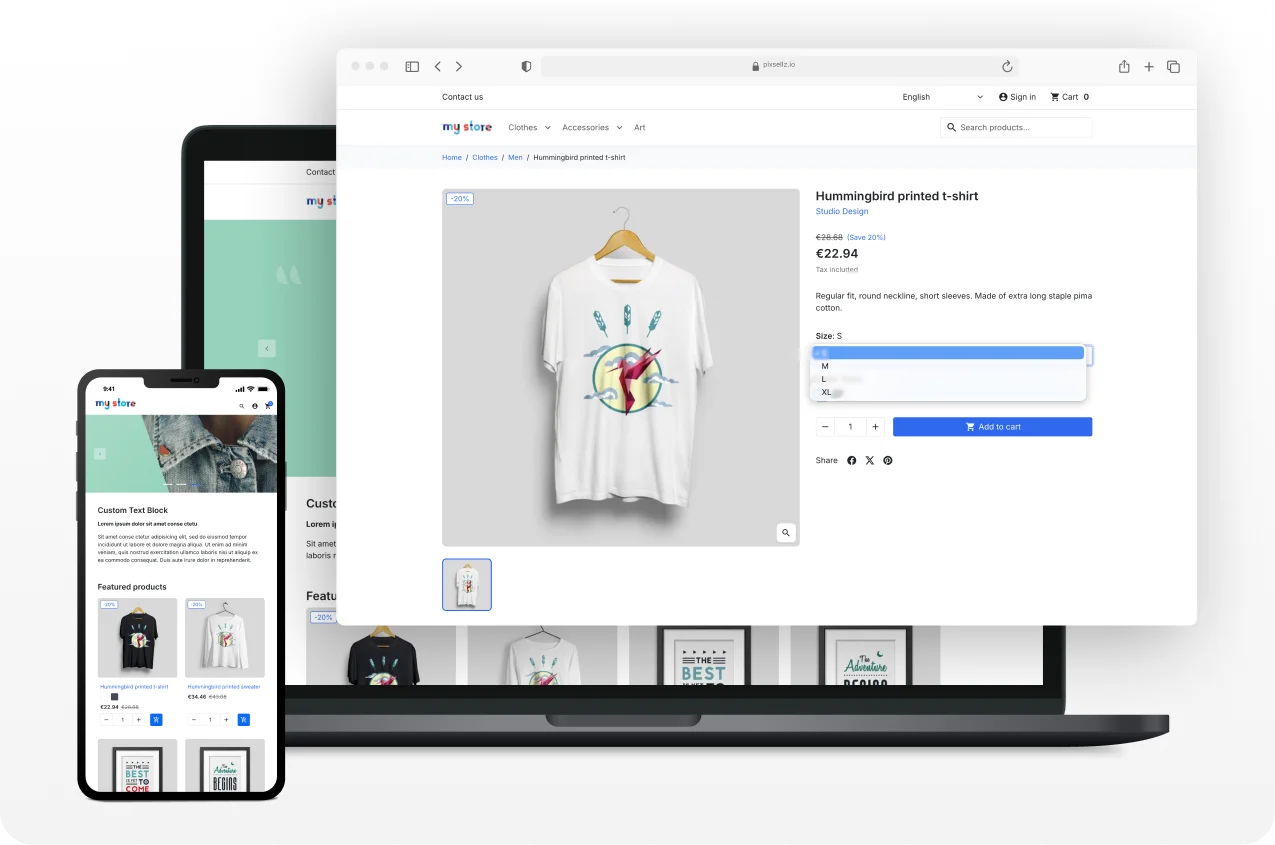
Hummingbird 2.0 theme on a live store
Hummingbird supports WebP and AVIF images and defers non-critical JavaScript. These changes can help reduce the amount of code and image data a browser needs to process, which may improve load times, especially on mobile devices.
Accessibility is another focus. The Hummingbird project reports more than 95% compliance with European Accessibility Act requirements. It’s a useful baseline, but store owners should still test their own storefront, especially after adding custom code or third-party modules.
Thus, Hummingbird can provide a stronger starting point for performance and accessibility. But the theme alone doesn’t determine a store’s results. Actual performance still depends on hosting, caching, third-party scripts, images, and custom code.
Checkout Improvements
PrestaShop 9 makes several changes to the checkout experience.
It offers more flexible guest checkout. Customers can check out as guests even when an account already exists for their email address.
PrestaShop 9 also provides clearer cart feedback. Online shoppers receive a notice when the product they view is already in their cart. It can help prevent duplicate additions.
These changes remove some common points of friction during shopping and checkout. Their effect on conversion will depend on the store’s overall checkout flow and implementation.
PrestaShop 9 SEO Improvements
PrestaShop 9 provides ecommerce store owners with improved SEO capabilities without requiring separate PrestaShop modules for each task:
- Cleaner product URLs. Now you can remove category names from product URLs. It may help search engines find and rank the pages that matter.
- Optional language prefixes. The default language can use URLs without a language prefix.
- Built-in redirects. Inactive products and categories can use 301 or 302 redirects.
- Better control of faceted pages. Filtered listing pages are excluded from indexing by default, which can help limit duplicate-content issues.
- Modern image formats. WebP and AVIF support can reduce image file sizes and page weight to make faster page loads.
These changes can give merchants more control over URLs, redirects, indexing, and image formats. They can support a cleaner technical SEO setup, but they do not guarantee higher rankings.
Security and Compliance Improvements
Security in PrestaShop 9.0 has been strengthened both in the core and through best practice enforcement:
- Randomized table prefixes protect against SQL injection attempts.
- Hardened file protection ensures sensitive files are not directly accessible.
- Long-term security support means Symfony 6.4 and PHP 8.1 and newer will receive updates for years, which reduces urgent upgrade pressure.
- Direct access to certain file types now returns a 403 Forbidden error.
PHP 8.4 includes numerous security fixes for PrestaShop 9.
Benefits of PrestaShop 9
What do these changes mean for an ecommerce store?
- A more current, supportable platform. PrestaShop 9 runs on Symfony 6.4 LTS and supports modern PHP versions. It reduces reliance on outdated software components and gives the platform a longer security support window.
- Better options for integrations. The new Admin API gives developers a modern way to connect PrestaShop with ERPs, CRMs, marketing platforms, and other systems. It is designed to improve on the older Webservice API, although its coverage is still expanding.
- A stronger base for storefront performance. Hummingbird uses a modern, mobile-first approach and supports features such as deferred non-critical JavaScript and WebP/AVIF images. These can help reduce page weight and improve performance, but actual results depend on the store’s hosting, modules, content, and customizations.
- Stronger security defaults. PrestaShop 9 adds protections such as randomized database table prefixes, direct file access protection, and tighter control of debug mode. These measures help keep stores secure by reducing some common risks at the platform level.
- Better tools for easier upgrades. The Update Assistant provides requirement checks, backups, restore options, detailed logs, and a CLI for updates. It gives merchants and developers more control over the update process.
PrestaShop 9 does not automatically make a store faster, rank higher, or convert better. It provides a more modern base for those improvements. The results still depend on the store’s implementation, configuration, and ongoing maintenance.
PrestaShop 9 vs PrestaShop 8
Let’s compare PrestaShop 8 and PrestaShop 9 to understand the differences in API standards and potential performance improvements when upgrading from PrestaShop 8 to 9.
| Area | PrestaShop 8.x | PrestaShop 9.x |
| Core architecture | Symfony 4.4 LTS, with legacy components still present | Symfony 6.4 LTS, with more Back Office pages migrated to Symfony |
| PHP support | PHP 7.2.5-8.1 | 9.0: PHP 8.1-8.4
9.1: PHP 8.1-8.5 |
| API | Legacy Webservice API | New Admin API based on API Platform, alongside the legacy Webservice API |
| Storefront/theme | Classic theme based on Bootstrap 4 | Hummingbird 2.0 based on Bootstrap 5; default theme from PrestaShop 9.1, with a stronger focus on performance and accessibility |
| SEO and media | Basic native SEO controls, WebP support | More URL and redirect controls, improved indexing controls, plus native AVIF support |
| Security | Security features such as password policies and other standard protections | Additional protections such as randomized database prefixes, stricter access to sensitive files, and tighter debug-mode controls |
| Module/theme ecosystem | Mature ecosystem with broad compatibility | Growing ecosystem; some existing modules and themes may need updates for PrestaShop 9 |
| Maintenance | 8.2 is in extended support and receives security fixes | Actively developed, with 9.1 released and 9.2 currently in beta |
| Upgrade effort | – | Depends on the theme, modules, custom code, and store complexity |
For most merchants, the biggest practical difference is the combination of a newer platform, a new default storefront theme, modern API options, and a changing module ecosystem.
PrestaShop 8 still has a mature ecosystem and remains supported through its 8.2 branch. PrestaShop 9 is the active major version, but stores with heavily customized themes or third-party modules should check compatibility before upgrading.
PrestaShop 9 Requirements
If you are planning an upgrade PrestaShop 8 to 9, it’s better to check the PrestaShop 9 PHP requirements and confirm your hosting environment supports your specific PrestaShop 9 version.
The requirements have changed slightly across the 9.x releases.
Minimum vs Recommended Environment
Before upgrading to PrestaShop 9, check that your server meets the required environment. The table below gives a quick comparison of the minimum versions and the setup recommended for a new or upgraded store.
| Component | Minimum | Recommended |
| PHP | 8.1 | 8.5 for PrestaShop 9.1 |
| MySQL | 5.7 | A recent, maintained version |
| MariaDB | 10.2 | A recent, maintained version |
| PHP memory limit | 512 MB | No less than 512 MB |
| Web server | Apache 2.4+ or Nginx 1.0+ | A current, maintained version |
PHP 7.x is no longer supported. PrestaShop 9.1 supports PHP 8.1-8.5, while the official documentation currently recommends PHP 8.5. If your store runs an older PHP version, it’s better to update the server environment before starting the upgrade.
The server also needs several PHP extensions, including cURL, DOM, Fileinfo, GD, Iconv, Intl, Mbstring, OpenSSL, PDO, PDO_MySQL, SimpleXML, and ZIP. The allow_url_fopen setting must also be enabled.
Composer and Node.js are mainly relevant to developers who work with the PrestaShop source code. The current development documentation specifies Node.js 20.x. A standard production installation does not require merchants to manage these tools themselves.
The PHP version is only one part of upgrade compatibility. Modules and custom code can also cause problems if they rely on older PHP or PrestaShop behavior.
Test the upgrade in a staging environment first, then check key areas such as the storefront, checkout, payments, shipping, customer accounts, and back office before updating production.
Should I Upgrade to PrestaShop 9?
There’s no single right answer on whether you should upgrade to a new version of PrestaShop. It depends on your current version, your store’s complexity, and your ability to test the upgrade properly.
If You’re on PrestaShop 8
This is the most direct upgrade path. Check your modules, theme, and custom code to ensure compatibility with PrestaShop 9. Test the upgrade on staging before moving to production. Pay particular attention to critical modules and custom functionality.
If Your Store Is Heavily Customized
Plan for more testing regardless of your starting version. Custom code, overrides, modules, themes, and integrations should be reviewed for PrestaShop 9 compatibility. Pay particular attention to code that relies on core components affected by the upgrade.
If You’re Launching a New Store
For a new production store, PrestaShop 9.1 is the current stable choice. Starting with 9.1 means you don’t have to carry forward legacy code. You should check that the modules, theme, and integrations you need support your chosen version. You will start on the modern Symfony framework and benefit from better performance, an improved admin UI, and SEO improvements.
If You Have Limited Technical Resources
Wait until you can test the upgrade properly, or work with a PrestaShop-experienced developer or agency. Set up a staging environment, create a reliable backup, and have a rollback plan before upgrading the live store.
Before deciding, check four things:
- Which of your current modules and theme have confirmed PrestaShop 9 compatibility.
- Whether your hosting supports PHP 8.1 or later. For PrestaShop 9.1, PHP 8.5 is the recommended version.
- How much custom code, overrides, and third-party integrations your store relies on.
- Whether you can test the upgrade on staging before touching production.
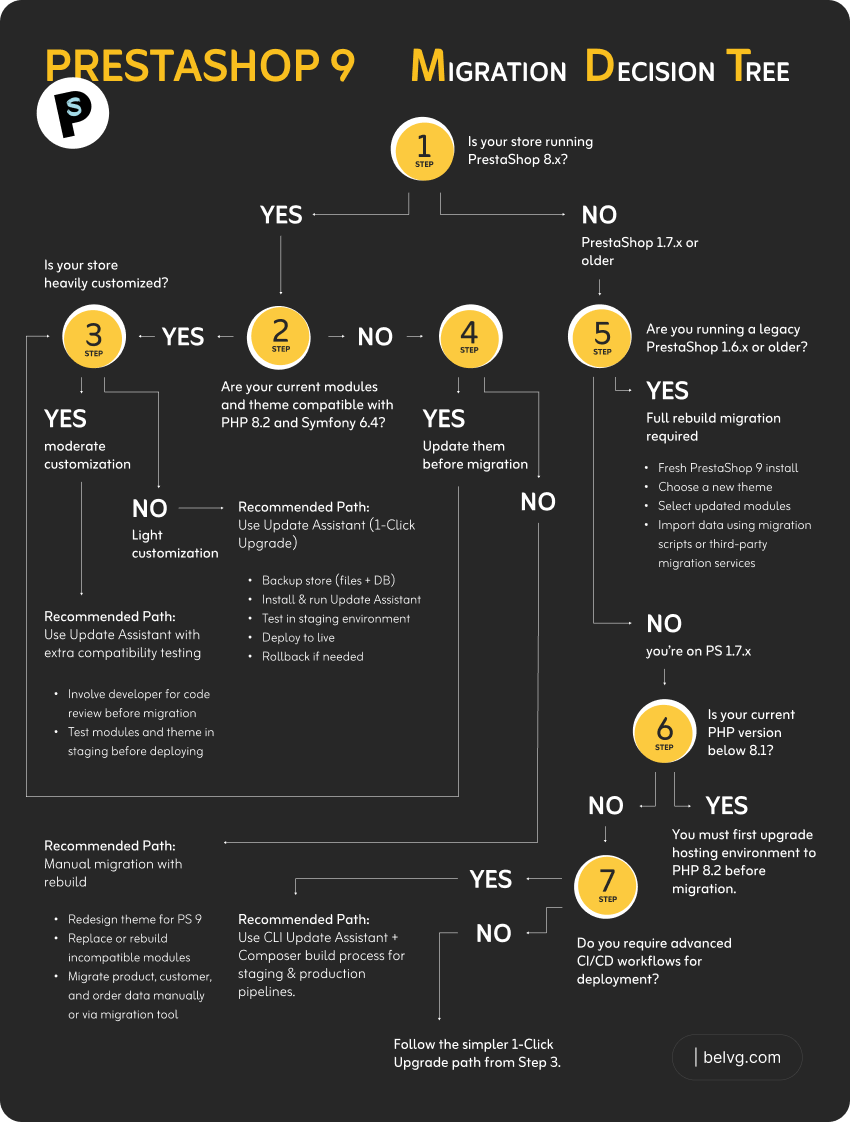
A quick way to check compatibility is to run your store through the BelVG PrestaShop scanner. It can help identify known issues before you commit to a migration timeline.
PrestaShop 9 Upgrade: How the Process Works
PrestaShop’s rebuilt Update Assistant adds more checks, logging, backup, restore, and CLI capabilities to the upgrade process. A safe upgrade generally follows these steps:
- Audit compatibility first. List every module, plugin, and theme customization in use, and confirm which have a PrestaShop 9-compatible release.
- Back up everything and test the restore. A backup that hasn’t been verified as restorable isn’t a real backup.
- Clone to staging. Never run the upgrade directly on a live store.
- Run the Update Assistant on staging. Let it flag incompatible modules, themes, or PHP configuration issues before you touch production.
- Replace or update anything flagged as incompatible. Usually the most time-consuming step.
- Test critical flows end to end. Browsing, search, cart, checkout, payment methods, shipping, and order management.
- Schedule the production migration during low-traffic hours, with backups ready for an immediate rollback.
- Monitor closely for the first 48-72 hours after go-live – error logs, checkout completion rates, and payment gateway responses.
In BelVG’s experience, a simple store with few customizations may take days to prepare and migrate, while a store with a custom theme, many modules, and complex integrations may require several weeks.
Final Thoughts
PrestaShop 9 is now an established major version. The 9.1 branch has received multiple maintenance and security releases, while 9.2 remains in beta, as of August 2026. The architecture, API, theme, and security improvements are real, but they’re a foundation. Performance, SEO, and conversion gains depend on how you implement and maintain the upgrade.
If you’re still on PrestaShop 8 or 1.7, the right next step is a compatibility audit of your specific modules, theme, and hosting environment.
BelVG’s PrestaShop development team can take full backups before any updates, review your current setup, and outline a realistic upgrade plan based on your modules, customizations, and traffic patterns. We can run your store through the PrestaShop scanner without any commitment.
Whatever your role, the new version of PrestaShop offers modern development tools to achieve it.