


Git Pipeline provides an extensible set of tools for modeling build, testing, and deploying code. All jobs in a stage are executed simultaneously, and if it succeeds, the pipeline moves on to the next stage. If one of the jobs fails, the next stage is usually not executed.
Stages
The following pipeline job steps in Magento 2.2 projects:
1. Build – compilation and packaging of the project.
2. Testing – automated testing with default data.
3. Staging – manual testing and decision on going live.
4. Production – manual.

Modern Magento projects usually use CI/CD pipelines with Docker-based environments and supported PHP versions. The pipeline configuration should include dependency installation, automated tests, static content deployment, and build artifacts. Environment variables and secret management should be used for database credentials, API keys, and deployment settings. Before deploying to production, teams commonly add approval steps and automated checks to reduce deployment risks.
How is it used with Bitbucket and GitLab?
Typically, the definition of a Git Pipeline is written into a text file, which is checked into a project’s source control repository.
Bitbucket:
bitbucket-pipelines.yml
GitLab:
.gitlab-ci.yml
Bitbucket features
– Custom params
– SSH Keys
– Integration with third-party services
– Free instances (4GB of RAM; 2 hours execution time; 5GB of disk space)
Bitbucket Pipeline Structure
In order to describe the pipeline, we use yml.
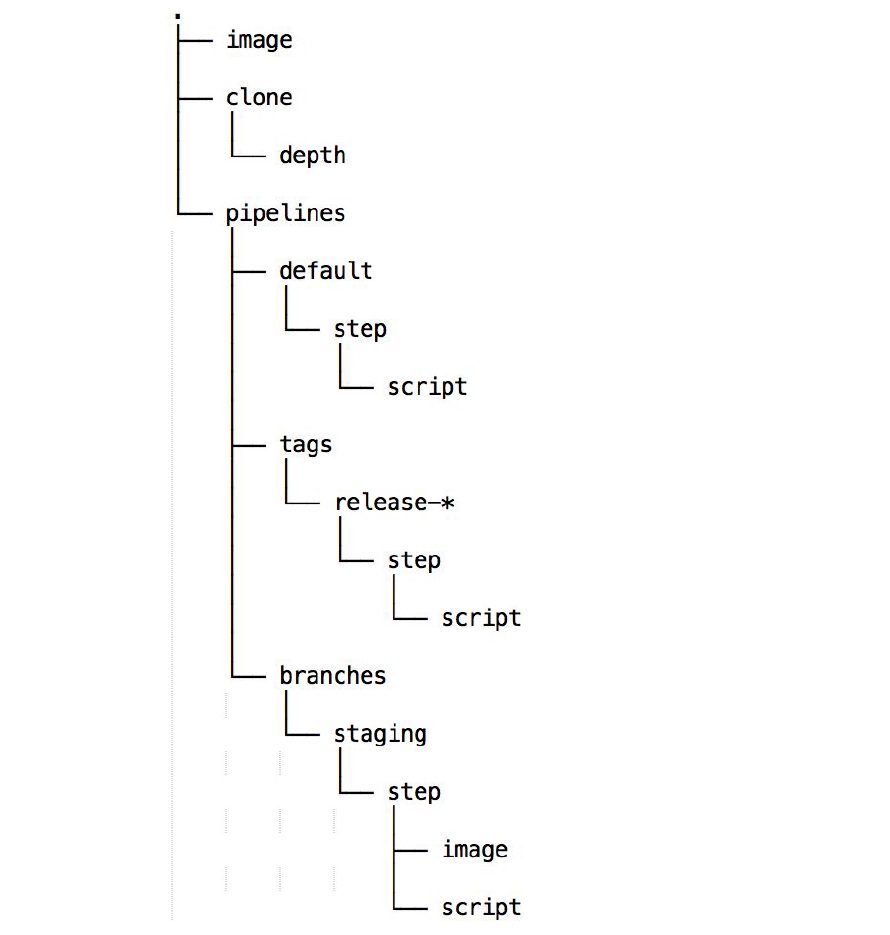
Bitbucket example
bitbucket-pipelines.yml
|
1 2 3 4 5 6 7 8 9 10 11 12 13 14 15 |
image: php:7.1.1 pipelines: default: - step: script: - apt-get update && apt-get install -y unzip - curl -sS https://getcomposer.org/installer | php -- --install-dir=/usr/local/bin --filename=composer - composer require magento/product-community-edition 2.1.9 --no-update - composer update - rm -rf var/di var/generation - php bin/magento setup:install ... - php bin/magento cache:flush - php bin/magento setup:upgrade - php bin/magento setup:di:compile - php bin/magento indexer:reindex |
Limitations of Bitbucket Pipelines
The free Bitbucket plan comes with a set number of builds and is available for only 50 minutes each month.
Features that are not available for Pipelines yet:
1. Building Windows applications
2. Accessing services like artifact repositories or container registries behind a firewall

Magento Development Services
Take your online store to the next level with BelVG Magento development
Click to visit the pageGitLab features
– Multi-platform
– Custom params
– SSH Keys
– Integration with third-party services
– Free instances
– Support local machine and private services
– Triggers
GitLab Pipeline Structure
The GitLab structure of the pipeline is similar to the Bitbucket structure, with some minor differences:
|
1 2 3 4 5 6 7 8 9 10 11 12 13 14 15 16 17 18 19 20 21 22 23 24 |
image: php:7.1.1 services: - solr variables: - PORT: 8984 before script: - configure solr after script: - rm secrets stages: - build - deploy job1: stage: build script: - executive-script-for-job1 only: - master |
Limitations of GitLab Pipelines
You are limited to using only the CI predefined variables in the environment: name. If you try to reuse variables defined inside a script as part of the environment name, it will not work.
If you need a full range of Magento development services, turn to the BelVG company and get a professional consultation from ecommerce specialists.